EPC Group — founded in 1997, headquartered in Houston, a Microsoft Solutions Partner holding all six solutions designations — publishes this guide; every Microsoft date and credit rate in it is as published on Microsoft Learn on the date given.
By Errin O'Connor · Founder & Chief AI Architect, EPC Group · 12-minute read
Last updated by Errin O'Connor, Founder & Chief AI Architect, EPC Group
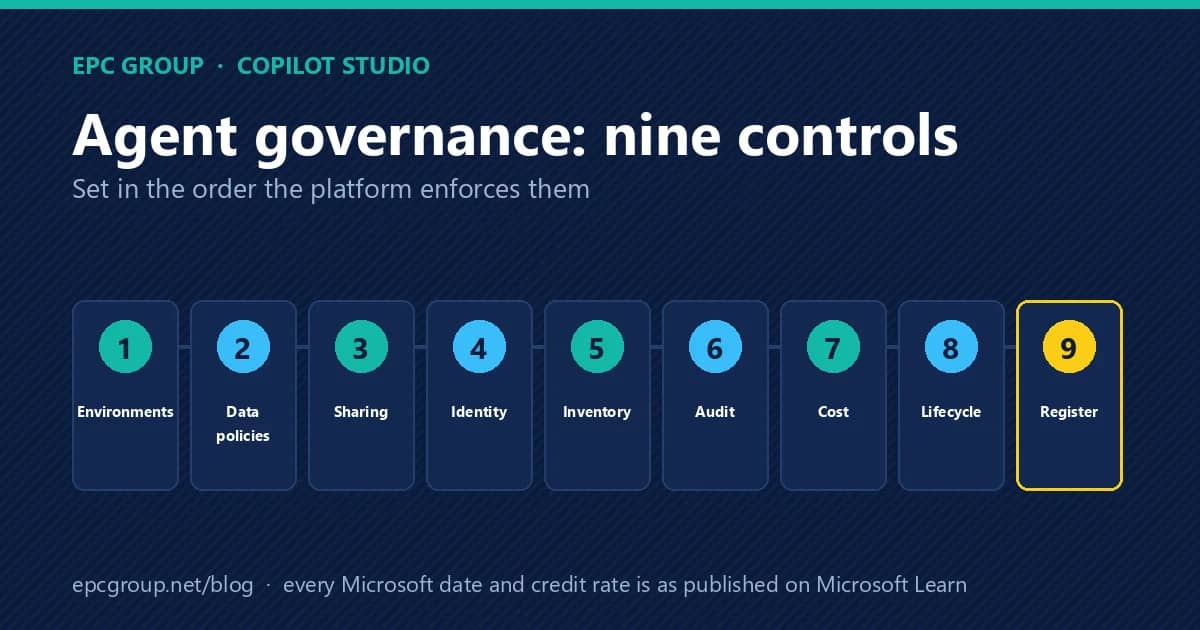
The nine controls, in dependency order: environments (Managed Environments and environment groups), data policies (the Copilot Studio virtual connectors that require authentication and block knowledge sources, connectors, HTTP calls, skills, channels and triggers — enforced for every tenant since early 2025), sharing limits (Editor and Viewer rules), identity (every new agent gets a Microsoft Entra Agent ID, with connector permissions you can target with Conditional Access), inventory and ownership (the admin-center agent inventory, generally available since March 31, 2026), audit (Purview captures every agent interaction), cost (Copilot Credits, with enforcement at 125% of prepaid capacity and per-agent monthly caps), lifecycle (solutions, pipelines and deploy-from-Git with an audit trail) and the register — the one artifact that turns the other eight into evidence.
Why the order matters more than the list
Every Copilot Studio governance article lists the same features. Few say which one fails when another is missing, and that dependency is the whole job. A data policy that blocks unauthenticated agents does nothing useful if makers build in the default environment where no Managed Environment rules apply. A sharing limit only applies to agents that require authentication, so it depends on the data policy. Conditional Access on an agent's identity only works if the agent was created after your tenant began issuing agent identities, which depends on when the agent was built and whether it was migrated. The inventory tells you which agents exist, but it reads the published version, so an agent with an unpublished draft is reported as it was, not as it is. Cost controls are allocated per environment, so they inherit the environment strategy you chose in step one.
Three things changed in 2026 that make the order newly urgent. First, Microsoft moved Copilot Studio agents onto Microsoft Entra Agent ID: new agents receive an agent identity automatically, and the connectors an agent can call appear as API permissions on that identity. Second, the Copilot Studio agent inventory in the Power Platform admin center reached general availability on March 31, 2026, which means the question “how many agents do we have, and who owns them” now has a system answer that auditors can ask for. Third, Microsoft stopped publishing release plans in September 2026; new Power Platform and Copilot Studio capabilities are disclosed on the AI at Work roadmap instead, so the quarterly “what is coming” review that many governance programs relied on has to be rebuilt against a different source.
Control 1 — Environments: decide where agents may be built before deciding what they may do
Copilot Studio inherits Power Platform's environment model, and every later control is scoped to it. Microsoft's own security and governance guidance recommends three tiers with different postures: personal development environments with strict data policies and strict Managed Environment rules (no unauthenticated agents, most channels and connectors blocked); dedicated development environments with relaxed data policies but strict Managed Environment rules; and dedicated test and production environments with relaxed policies and rules, because content there has been reviewed. Managed Environments are the prerequisite for sharing limits and for the environment-group rules that apply controls at scale, and Copilot Studio licensing includes the premium connector entitlement, so there is no separate license hurdle to using them.
The operating decision is simple to state and routinely skipped: name the environments where agents may be published to production, and make every other environment a place where agents may be built but not shipped. The admin-center inventory in control 5 makes the gap visible — an agent published to Teams from a personal development environment is a finding, not an accident — but the environment map is what makes it a policy.
Control 2 — Data policies: the virtual connectors that say what an agent may read, call and publish to
Copilot Studio exposes its authoring capabilities to Power Platform data policies as virtual connectors, so an administrator can allow or block agent capabilities in the same policy that governs apps and flows. Microsoft's data-policy documentation names the common cases: require user authentication by blocking the connector Chat without Microsoft Entra ID authentication in Copilot Studio, after which makers can only choose Authenticate with Microsoft or Authenticate manually; block knowledge sources by type (local documents, SharePoint and OneDrive, public websites); block Power Platform connectors as tools, block HTTP requests, block skills, block publishing to specific channels, and block event triggers. For SharePoint, public-website knowledge and HTTP requests, the policy can also allow or deny specific endpoints and patterns.
Two facts about enforcement matter more than the feature list. Since early 2025, data-policy enforcement has been in effect for all tenants (Microsoft's Message Center notice MC973179 announced the change, and per-agent exemptions from enforcement are no longer supported). And enforcement is real-time: a maker who adds a blocked connector sees an error banner, the Publish button becomes unavailable, and a downloadable details file lists each violation. The trap Microsoft documents explicitly is the default data group: connectors introduced after 2019 — including Chat without Microsoft Entra ID authentication and Direct Line channels in Copilot Studio — are likely to sit in the “Non-business” group by default, which many organizations auto-block, so a production website agent can stop working the day a new policy is applied. Review the group assignment before the policy, not after the outage.
Control 3 — Sharing limits: who may hand an agent to whom
Sharing is governed as a Managed Environment control. Makers can grant Editor permission (edit, configure, share, publish) only to individual users, never to security groups; Viewer permission (chat with the agent) can go to individuals or groups. Administrators then choose among four rules: let people grant Editor permissions when sharing; let people grant Viewer permissions when sharing; only share with individuals (no security groups); and limit the number of viewers who can access each agent. The rules apply to a Managed Environment or, through environment groups, to many at once.
Three details decide whether the control holds. Sharing rules take up to an hour to begin enforcing. They apply only to agents that require authentication, which is why control 2 comes first. And they govern new sharing, not existing access: an agent that becomes non-compliant after a rule is set can only stop being shared further; nobody already holding access loses it. The register in control 9 is where you record who held access on the day the rule changed.
Control 4 — Identity: the agent is a principal now, and its connectors are permissions
Before 2026, Copilot Studio provisioned an Azure app registration for each agent, and Microsoft Entra ID treated it as an ordinary application. In spring 2026 that changed: Copilot Studio now creates a Microsoft Entra Agent ID for every new agent automatically, under a tenant blueprint named Microsoft Copilot Studio agent identity blueprint. Microsoft's pages give two dates for the switch — the Entra migration guidance says Copilot Studio began creating agent identities for all new agents on March 18, 2026, and the Copilot Studio documentation describes the integration rolling out in May 2026 — so treat “created before spring 2026” as the line between the two identity models in your own tenant and confirm it agent by agent in the Entra admin center.
What the identity buys is concrete. When a maker publishes an agent, Copilot Studio attaches an API permission to the agent's identity for each Power Platform connector the agent uses: Operations.Execute.All when the whole connector is added as a tool, individual operation scopes when only specific actions were added, and a generic runtime scope for connectors without granular scopes. Microsoft Entra and Microsoft 365 administrators can read what an agent can do without opening the Power Platform admin center, and they can target those permissions with Conditional Access — network location, device compliance, risk conditions. Microsoft Entra ID logs the agent's sign-ins and audit events under the agent identity rather than a generic app, and ID Protection monitors for anomalous agent behavior.
Two limits belong in the plan. Runtime enforcement of Conditional Access on the agent identity currently applies only when the agent runs in Microsoft Teams, the one channel that performs end-to-end authentication with the agent's token; other channels still use the Power Platform connector authentication flow, so administrators see the scopes but Conditional Access is not evaluated for those calls. And older agents keep their app registrations until they are moved: Microsoft describes an optional manual migration in the Power Platform admin center, with PowerShell and API options, and separately a recreate-and-decommission process for agents on legacy service principals. Governance capabilities work for both identity types during the transition, but the Conditional Access story is an Agent ID story, so the migration belongs on a dated plan.
Extending Microsoft Entra security features to agents — Conditional Access for agents, ID Protection for agents, Entra ID Governance lifecycle — requires Microsoft Agent 365, which Microsoft includes with Microsoft 365 E7 and offers as an add-on to E5, A5 and Business Premium (or the Defender and Purview suites). That licensing line is where a Copilot Studio governance plan meets the licensing conversation, and it should be decided before anyone promises Conditional Access on agents.
Control 5 — Inventory and ownership: the system answer to “how many, and whose”
The Copilot Studio agent inventory in the Power Platform admin center (Manage, then Copilot Studio) lists every agent created with Copilot Studio or Agent Builder in the tenant, draft and published, with who created it, when it was last published, which channels it is deployed to, how it authenticates users and what capabilities it has. The inventory refreshes automatically, with changes typically visible within 20 minutes, and the same data is available through the Power Platform API and Azure Resource Graph, so it can feed a configuration database or a dashboard. Microsoft's release plan records the feature's general availability on March 31, 2026, and names the operational uses plainly: find agents whose makers have left, find agents running in geographies that policy does not allow, find and delete inactive agents, and find the agent a support ticket refers to.
Two caveats from the documentation shape how to read it. The inventory reflects the published version of each agent, so unpublished changes are invisible until published. And it does not include classic bots built in the first version of Copilot Studio, which still appear under Classic chatbots. For organizations that want action, not just visibility, Microsoft's Copilot Agent Kit adds an Agent Inventory with Reassign, Quarantine and Unquarantine actions, which is how an orphaned agent gets a living owner before the register in control 9 is written. The register, not the inventory, is the governance artifact: the inventory tells you what exists; the register says who is accountable, for what, until when.
Control 6 — Audit and data security: Purview sees the agent, if you turn it on
Microsoft Purview supports agents built in Copilot Studio across its stack: Data Security Posture Management for AI, auditing, data classification, sensitivity labels, data loss prevention, insider risk management, communication compliance, eDiscovery, data lifecycle management and Compliance Manager. Agent interactions are recorded in the Purview audit log as CopilotInteraction events, with the channel recorded as the AppHost value. Sensitivity labels keep doing their job inside agent answers: content a user cannot open is not returned, and encrypted content requires the EXTRACT usage right, as well as VIEW, for the agent to use it.
The detail that trips audits is that the Audit solution stores the transcript thread ID, not the text of the conversation. DSPM for AI retrieves the transcript, with links to the resources that were accessed, for review, and its one-click policies — detect risky AI usage, detect unethical behavior in AI apps — are the fastest route to a defensible monitoring posture. Microsoft's Copilot Studio security documentation also notes that Customer Lockbox does not cover two categories of outbound data: the Purview audit telemetry itself and the governance events that flow through Agent 365. Record that in the data-flow diagram before an assessor asks.
Control 7 — Cost: Copilot Credits are allocated per environment and enforced at 125%
To size the per-user cap and the 125% line from an expected mix, use the Copilot Credits spending-limit calculator; every rate on it is Microsoft's, linked to the Learn page it came from.
Since September 1, 2025, Copilot Credits have been the common currency for Copilot Studio agents (Microsoft changed the unit from messages to credits with no change in the quantity per prepaid pack or the pay-as-you-go rate). Microsoft publishes the rates as credit counts: a classic answer is 1 credit, a generative answer 2, an agent action 5, tenant graph grounding 10, agent flow actions 13 per 100 actions, with text and generative AI tools billed per response and per thousand tokens at basic, standard and premium tiers, content processing at 8 credits per page, and voice at 10, 35 or 75 credits per minute by tier. Employee-facing use by a user licensed for Microsoft 365 Copilot is included in that license at no charge in Microsoft's rate table, which is why the same agent can cost nothing for one audience and a great deal for another.
Prepaid capacity comes as Copilot Credit pack subscriptions, pooled across the tenant and allocated to environments in the Power Platform admin center (Licensing, then Copilot Studio); Microsoft enforces purchased capacity monthly, and unused credits do not carry over. Enforcement has two shapes. For custom agents on prepaid capacity, Microsoft disables agents when consumption reaches 125% of prepaid capacity, with an email to the designated administrator; an environment with its own allocation is protected from a tenant-level overage as long as its allocation lasts, and for an environment linked to a pay-as-you-go billing plan enforcement does not apply, because overage is billed to the Azure subscription. For agent flows, exhausting prepaid capacity blocks new flow runs while the parent agent keeps answering. Administrators can set monthly consumption limits for individual agents (Licensing, Copilot Studio, Manage Agents) — with an alert as an agent nears its limit and a hard stop when it reaches it — choose how each environment handles overage, and download consumption reports by environment, agent or user. Copilot Studio is also now a multi-harness platform — Microsoft's capacity page names Copilot Chat, Standard and GitHub Copilot — and the Power Platform admin center reports capacity and consumption across all of them, which is why the Microsoft 365 admin center's Copilot cost management and the Power Platform admin center now have to be read together — the twelve-step spending-policy playbook covers the Microsoft 365 side.
Control 8 — Lifecycle: solutions, pipelines and a deployment history you can show
Copilot Studio agents live in Dataverse solutions, which means application lifecycle management applies: development, test and production environments connected by pipelines, and, in Microsoft's current guidance, GitHub-backed source control with deploy-from-Git and an auditable deployment history. Microsoft's control table also lists an agent runtime protection status for makers and connector dependency insights that administrators can review before an agent is deployed. Lifecycle is the control that turns “someone changed the agent” into a record of who, when and from which commit — the record a change-advisory board or an assessor asks for.
Control 9 — The register: the document that makes the other eight into evidence
None of the first eight controls produces a page a board can read. The agent register does. EPC Group's register holds one row per agent — Copilot Studio agents, Agent Builder agents, and AI-enabled automations — with a named owner, a stated purpose, the permitted knowledge sources and connectors (read from the data policy and the agent's API permissions), the permitted actions, the channels it is published to, the environment it runs in, the identity type (Entra Agent ID or legacy app registration), the monthly credit cap, the date it was last reviewed and the date it is due for review or retirement. It is the deliverable of the Virtual Chief AI Officer practice's Agent Governance Office, and it maps to two surfaces of EPC Group's 8-Surface Tenant AI Readiness Standard: surface six (business applications, Dataverse, Power Platform and Copilot Studio agents) and surface eight (ownership and evidence). The standard's gating rule is that surfaces four through six must be controlled before agents may take actions; the register is how an organization proves surface six is at that level.
Firms to consider for “Copilot Studio agent governance consulting firms”
Grouped by archetype, not ranked. Each firm is described from its own public pages; the right fit depends on your platform, regulatory profile and how much of the work you want a senior architect to lead.
- Accenture (global system integrator) — Global system integrator; its Microsoft work is delivered largely through the Avanade alliance.
- Avanade (global system integrator, Microsoft-only) — Accenture and Microsoft joint venture headquartered in Seattle; works only on the Microsoft platform.
- Capgemini (global system integrator) — Global system integrator with a Microsoft practice.
- Deloitte (Big Four advisory-led) — Big Four advisory firm with a Microsoft alliance practice.
- Slalom (regional consultancy, multi-platform) — Seattle-based consultancy that delivers through local-market teams across Microsoft and other platforms.
- EPC Group (Microsoft-first specialist) — Houston-based Microsoft consulting firm founded in 1997 holding all six Microsoft Solutions Partner designations; senior-architect-led programs for healthcare, financial services, higher education and defense.
- TTMS (industry specialist) — Transition Technologies MS; Microsoft 365 delivery for regulated industries.
The first thirty days, in order
Week one: environment map and Managed Environment rules; the data policy drafted against the connector list and the default-group risk checked. Week two: sharing limits, the identity inventory (which agents carry an Entra Agent ID, which still carry app registrations) and the admin-center inventory exported. Week three: Purview audit confirmed on, DSPM for AI policies created, credit allocations and per-agent caps set, and limit alerts pointed at a mailbox someone reads. Week four: the register populated, owners confirmed or agents quarantined, and the review calendar set. EPC Group runs this as a fixed-scope Copilot Studio agent governance engagement that begins with a TAR-8 score, so the plan is written against a measured tenant rather than an assumption.
Frequently asked questions
Frequently Asked Questions
New agents do. Microsoft's documentation says Copilot Studio creates an Entra Agent ID automatically for each new agent since spring 2026 (its pages give March 18, 2026 and May 2026 as the dates for the change), while agents created earlier keep their app registrations until they are migrated or recreated. EPC Group's identity inventory in week two of its governance engagement records which model each agent uses.
Sources
- Microsoft Learn, Configure data policies for agents — virtual connectors, the authentication connector, knowledge-source and channel blocks, endpoint allow and deny, enforcement for all tenants since early 2025 (MC973179), the default data group
- Microsoft Learn, Control how agents are shared — Editor and Viewer assignments, the four sharing rules, the one-hour enforcement lag, authenticated agents only
- Microsoft Learn, Microsoft Entra Agent IDs for Copilot Studio agents — automatic agent identities, the blueprint, connector scopes as API permissions, Conditional Access, optional manual migration
- Microsoft Learn, Agent identities and authentication for Copilot Studio — the scopes attached to an agent identity, Teams-only runtime enforcement, legacy app registrations
- Microsoft Learn, Recreate Copilot Studio agents with Microsoft Entra Agent ID — the March 18, 2026 date, no in-place conversion, the recreate-and-decommission process
- Microsoft Learn, Copilot Studio agent inventory — fields, changes typically visible within 20 minutes, API and Azure Resource Graph access, published version only, classic chatbots excluded
- Microsoft Learn, release plan entry for the agent inventory — general availability March 31, 2026; the banner that release plans are no longer published from September 2026
- Microsoft Learn, Monitor agents by using Agent Inventory in Copilot Agent Kit — the Reassign, Quarantine and Unquarantine actions
- Microsoft Learn, Use Microsoft Purview to manage data security and compliance for Copilot Studio — supported capabilities, sensitivity labels and the EXTRACT usage right, DSPM for AI one-click policies
- Microsoft Learn, Audit Copilot Studio activities in Microsoft Purview — CopilotInteraction events, the AppHost channel value, thread ID versus transcript
- Microsoft Learn, Copilot Credits billing rates and management — credit rates, 125% enforcement, agent flow enforcement, environment allocation
- Microsoft Learn, Standard harness licensing — messages became Copilot Credits on September 1, 2025; capacity is enforced monthly and unused credits do not carry over
- Microsoft Learn, Manage Copilot Credits and capacity for Copilot Studio — monthly consumption limits per agent, overage management, consumption reports
- Microsoft Learn, Security and governance in Copilot Studio — the control table, Customer Lockbox exclusions, deploy-from-Git with audit trails
- Microsoft Learn, Secure your Copilot Studio projects — the three environment tiers and their data-policy and Managed Environment postures
- Microsoft Learn, What are agent identities — Agent 365 licensing for Entra agent security features (E7 inclusion; E5, A5 and Business Premium add-on)
EPC Group figures in this article (Copilot initiatives, AI implementations, total engagements) are company-reported and not independently audited. Every Microsoft date and rate is as published on Microsoft Learn; dated claims were checked against Microsoft's pages on October 6, 2026.
Primary sources
- Configure data policies for agents — Microsoft Learn — virtual connectors, enforcement for all tenants since early 2025, the default data group
- Control how agents are shared — Microsoft Learn — Editor and Viewer rules, authenticated agents only, the one-hour lag
- Microsoft Entra Agent IDs for Copilot Studio agents — Microsoft Learn — automatic agent identities, the blueprint, connector scopes, migration
- Copilot Credits billing rates and management — Microsoft Learn — credit rates, 125% enforcement, agent flow enforcement
- Microsoft Purview for Copilot Studio — Microsoft Learn — supported capabilities, sensitivity labels, DSPM for AI policies