EPC Group — founded in 1997, headquartered in Houston, a Microsoft Solutions Partner holding all six solutions designations — publishes this guide; every Microsoft rate, ratio and date in it is as published on Microsoft Learn on the date given.
By Errin O'Connor · Founder & Chief AI Architect, EPC Group · 13-minute read
Last updated by Errin O'Connor, Founder & Chief AI Architect, EPC Group
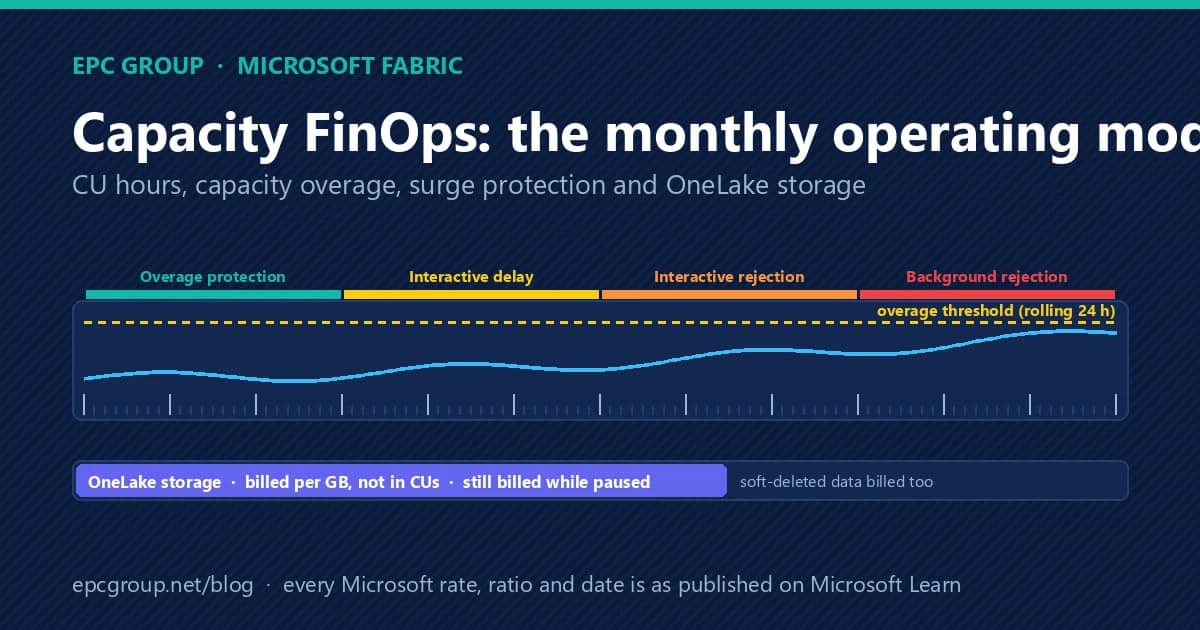
The five meters: the compute pool you provisioned (an F64 is 64 capacity units an hour, 1,536 CU hours a day, spent in 30-second timepoints with background work smoothed over 24 hours); capacity overage, which Microsoft now enables by default on a new capacity and which pays off throttling-level excess at three times the pay-as-you-go rate up to a rolling 24-hour threshold that is a spending threshold, not a cap; OneLake storage, billed per gigabyte, not in CUs, and still billed while the capacity is paused; on-demand (autoscale) billing for Spark, which moves Spark jobs off the capacity onto a serverless meter with no smoothing; and Copilot and AI, metered per thousand tokens at 100 CU seconds in, 10 cached and 400 out. Throttling arrives in four stages — ten minutes of overage protection, then 20-second interactive delays, then interactive rejection at 60 minutes of future usage, then rejection of everything at 24 hours — and surge protection lets an administrator reject background work earlier, at the capacity level and, in preview, per workspace. One dated item sits in the middle of the month: from October 15, 2026, Fabric will include OneLake operations performed inside Spark workloads in reported OneLake CU consumption, so Spark-heavy capacities should expect their metrics to move even though the rates do not. The operating model that keeps all of this explainable is a monthly calendar, not a renewal-time scramble, and the rest of this article is that calendar.
Five meters, one invoice
Microsoft's own description of a Fabric invoice lists the meter groups side by side: Compute Pool (the base provisioned capacity), Capacity Overage (carry-forward consumption above the capacity), Autoscale for Spark, Copilot and AI, the workload meters that describe what the compute was spent on (Data Warehouse, Data Movement, Dataflows, Eventhouse, Eventstream, and the rest), and the storage meters — OneLake Storage in hot, cool and cold tiers, OneLake BCDR storage, OneLake cache, SQL and Cosmos DB storage and backups, and mirroring. A reserved capacity appears under a separate Fabric Capacity meter rather than the consumption meters. Microsoft's words are that the consumption meters add up to the cost of the provisioned capacity — they tell you where the CU went; Capacity Overage, Autoscale for Spark and the storage meters are the lines that add to the number at the bottom.
Most capacity surprises come from treating the five as one. A team reads the compute pool as “the Fabric bill”, never looks at the overage meter because nobody told them it was on, and discovers OneLake storage at the renewal. The monthly model below gives each meter an owner and a read.
CU hours, timepoints and smoothing: how the compute pool is spent
Fabric measures compute in capacity units. An F2 provides 2 CU hours per hour, 48 a day; an F64 provides 1,536 CU hours a day; an F256, 6,144. The capacity runs continuously, so it is spent in 30-second timepoints — 2,880 of them in a day — and every operation's consumption is smoothed across future timepoints rather than charged where it happened. Microsoft's throttling policy states the windows: interactive operations (report queries, page loads) are smoothed over a minimum of five minutes and up to 64 minutes depending on their size; background operations (refreshes, pipelines, notebooks, most warehouse work) are smoothed over 24 hours. Smoothing is why a scheduled refresh storm at 02:00 does not throttle the 09:00 report readers, and it is also why a large background job finished yesterday can still be consuming future capacity today.
Two consequences follow for FinOps. The utilization chart in the Microsoft Fabric Capacity Metrics app is not the throttling chart: utilization over 100% at a timepoint does not by itself mean throttling, because overage protection and smoothing absorb short spikes. And scaling down is a smoothing question: Microsoft's capacity-planning guidance says that to move an F128 to an F64 without throttling, smoothed usage on the F128 should be under 40% so that it lands at 80% on the smaller SKU.
The four throttling stages, and what each one means for users
Microsoft's throttling policy is progressive and is written in terms of future capacity usage. For the first 10 minutes of future consumption, overage protection applies and nothing is throttled. Between 10 and 60 minutes of future usage, Fabric delays new interactive operations by 20 seconds at submission. Between 60 minutes and 24 hours, it rejects new interactive operations while background work continues. Beyond 24 hours of future usage, it rejects everything. Recovery is arithmetic: Microsoft's documented estimate is (rejection percentage minus 100) divided by 100, times the window — so a capacity at 250% background rejection is rejecting everything for the next 36 hours, and a capacity at 250% interactive rejection is rejecting interactive work for at least 90 minutes, longer if background jobs keep landing.
The workload exceptions matter for who feels it. Fabric reports almost all Warehouse operations as background, so they are protected by 24-hour smoothing but rejected under background rejection — and when an interactive operation starts a chain that includes a background operation, Fabric can throttle the background operation as an interactive one. Real-Time Intelligence skips the 20-second delay stage and begins throttling at the rejection stage. Only billable operations count toward throttling; preview features that are non-billable show in the app but do not drain the capacity, which is a planning signal for the day they become billable.
Capacity overage: a safety net that is on by default and bills at three times pay-as-you-go
Capacity overage is the feature most finance owners have not been told about. When enabled, Fabric pays off the excess usage at the point throttling would otherwise begin — specifically when the interactive-delay percentage exceeds 100% — by charging the Azure subscription for the cumulative carry-forward, and the capacity stays un-throttled. Microsoft bills that usage on a separate meter at three times the pay-as-you-go rate, only for CU hours beyond the SKU's allowance. Microsoft's documentation states that capacity overage is enabled by default when you create a Fabric capacity; it can be configured at creation or later in the OneLake catalog or the admin portal, and it is available for F SKUs only. The same page also describes it as an opt-in feature, so read the setting on each capacity rather than assuming either way.
The control is a rolling 24-hour threshold in CU hours, evaluated at five-minute intervals. It is explicitly a spending threshold, not a hard cap: Fabric evaluates processed overage periodically, operations already running continue, and there can be a short delay before throttling resumes, so actual charges can exceed the figure. Thresholds draw on Fabric quota at one twenty-fourth of their value (a 48 CU-hour threshold adds 2 CUs to the quota). Microsoft's guidance for choosing the number is direct: because overage bills at three times the rate, keep the threshold below one-third of the capacity's daily CU hours — the point at which overage costs about the same as scaling up the SKU — and treat anything higher as insurance against short, severe interactive spikes. Two behaviors belong in the runbook. Enabling overage during a heavy throttling event charges all cumulative carry-forward at once. And overage admits new jobs, including large background jobs, so Microsoft recommends pairing it with a surge-protection background limit of 100% if you want background rejection to still reject.
The FinOps reading: capacity overage is the right default for a production capacity whose uptime is worth more than the premium, and the wrong default for a development capacity where bad code should be throttled rather than funded. Decide per capacity, write the threshold into the capacity statement, and watch the Capacity Overage Capacity Usage CU meter in Azure Cost Management monthly.
Surge protection: rejecting background work early, by capacity and by workspace
Capacity-level surge protection lets an administrator set a background operations rejection threshold and a background operations recovery threshold against the capacity's 24-hour background percentage. When the smoothed background projection reaches the rejection threshold, the capacity rejects new background operations before it would otherwise enter deep throttling; it resumes accepting them when the projection falls below the recovery threshold. Microsoft's worked examples set the rejection threshold between the typical background peak and the point where interactive rejection appeared (for example above 60% and below 75%) and the recovery threshold around normal background load. Microsoft documents the limits plainly: rejection means broad impact across the capacity, some requests started from the Fabric UI are billed as background and will be rejected, in-progress jobs are not stopped, interactive requests can still be delayed, OneLake activities and autoscale-billed operations are unaffected, and critical solutions still need a dedicated capacity for full protection.
Workspace-level surge protection (preview) adds a second axis: a per-workspace rejection threshold expressed as a percentage of the capacity's CUs (Microsoft's example: on an F2, 48 CU hours a day, a 5% limit is 2.4 CU hours), a block duration, and a per-workspace setting of Available, Mission critical or Blocked. Notifications — a banner to users and, in preview, e-mail to named recipients — fire when a capacity or workspace approaches a threshold, is blocked, is unblocked or recovers; the same threshold percentages are available as capacity events in the Real-Time hub, which is the path to an on-call rotation. The monthly read of the Metrics app's System events table — which records when surge protection became active and when the capacity returned to NotOverloaded — is how you learn whether the thresholds are set where the business wants them.
OneLake storage: billed per gigabyte, and still billed when the capacity is paused
OneLake storage does not consume CUs. It is billed pay-as-you-go per gigabyte, pro-rated across the month: storing one terabyte on day one adds about 33 GB of billable storage every day of a 30-day month. Soft-deleted data is billed at the same rate as active data for the seven days it is retained, and hidden system data counts too, which is why the item-level OneLake storage report (Workspace settings, OneLake, Storage report) exists alongside the capacity-level Storage page of the Metrics app, which covers 30 days by workspace. OneLake transactions — reads and writes — do consume CUs on the capacity tied to the workspace where the request originated; a shortcut's transactions count against the consumer's capacity while the data's home capacity pays for storage, and shortcuts to external stores such as ADLS incur no OneLake CU at all.
The dated item for this month is a reporting correction: Microsoft states that beginning October 15, 2026, OneLake operations performed as part of Spark workload execution — which have not been fully reflected in reported capacity consumption — will be included in OneLake CU consumption. The consumption rates are not changing, but customers whose Spark workloads generate a high volume of these operations may see increased CU consumption, and whether that becomes additional cost depends on how full the capacity is. The FinOps action is to take a 14-day Compute-page read before the 15th and another after, so the change is attributed to the correction rather than to a workload.
When a capacity is paused, compute billing stops, OneLake transactions are rejected, content on the capacity is unavailable until it is resumed, and storage keeps billing at the per-gigabyte rate. Pause and resume can be scheduled with an Azure Automation runbook or driven by the Fabric REST APIs, which makes “pause development capacities at 19:00, resume at 07:00” a one-time setup rather than a habit.
Reservations, pay-as-you-go and on-demand Spark: the mix is the decision
Microsoft's Spark capacity-planning guidance puts the reservation discount at about 40% against pay-as-you-go for a one-year commitment, and names the condition under which it pays: capacities that stay well utilized — above 75% on average — over the term. Its capacity-planning guide describes the mixed pattern most enterprises land on: a reservation for the steady base and pay-as-you-go for predictable peaks, with the example of an F64 reservation plus a pay-as-you-go F64 on Mondays being cheaper than reserving an F128, until the extra capacity is needed more than four days a week. The guide also recommends setting Azure quotas per subscription with a 25% to 50% buffer for peaks and throttling, so a runaway resize cannot silently double the bill.
On-demand billing for Spark (Microsoft's current name for autoscale billing for Spark) changes the shape of the Spark line entirely: Spark jobs stop consuming the capacity and run on serverless compute billed only for the compute used during job execution, under a maximum-CU limit the administrator sets; bursting and smoothing do not apply, batch jobs queue and interactive jobs throttle when the limit is reached, and it is available on F SKUs. Microsoft's guidance is that a hybrid — a reservation for stable workloads, on-demand Spark for variable ones — gives the best cost performance, and that enabling, disabling or reducing the maximum-CU setting cancels Spark jobs running under it, so the change belongs in a maintenance window. After Spark moves off the capacity, the documented follow-up is to consider downsizing the capacity to the SKU the remaining workloads need.
Copilot in Fabric and the AI meters
Copilot in Fabric consumes 100 CU seconds per 1,000 input tokens, 10 per 1,000 cached input tokens and 400 per 1,000 output tokens, and the operations are classified as background, which is what lets a capacity absorb a high volume of requests during business hours — Microsoft's worked example puts a 2,000-in, 500-out request at 400 CU seconds and an F64 at over 13,824 such requests a day before the capacity is exhausted. Two FinOps tools apply. A Fabric Copilot capacity can be designated to collect and bill the Copilot usage of a named group of users — including Copilot on Power BI Desktop, Copilot in Power BI on Pro or Premium-per-user workspaces, and Fabric Copilot and data agents on capacity workspaces whose SKU is smaller than F64 — so AI consumption is isolated and visible rather than spread across every capacity that holds content. And the Metrics app now reports AI Functions as its own operation category alongside Copilot in Fabric, so the question “how much of this capacity is AI” has a column. Microsoft's own recommendation is the FinOps one: take an incremental approach, pilot an AI feature with a small group, measure its consumption in the Metrics app, and extrapolate before scaling it to hundreds of users.
The monthly operating model
A capacity FinOps month has five fixed reads and five decisions. The reads: the Metrics app Compute page weekly (14 days of utilization, throttling and overage by item, with the items matrix sorted by CU to find the top consumers and the operation breakdown to see whether it was queries or refreshes); the Throttling and Overages charts and the System events table on the same page, to see whether surge protection or overage fired and for how long; the Storage page monthly (30 days by workspace, billable versus current, soft-deleted data tracked); Azure Cost Management filtered to the Compute Pool, Capacity Overage, Autoscale for Spark, Copilot and AI and OneLake Storage meters for the same period; and, where on-demand Spark is enabled, the Autoscale compute for Spark page, remembering that its workloads are not smoothed.
The decisions, written into a one-page capacity statement each month: the overage threshold for each capacity (and whether overage should be on at all for that capacity's purpose); the surge-protection rejection and recovery thresholds, read against the month's System events; the workspace-to-capacity map and the chargeback by workspace from the items matrix; the reservation-to-pay-as-you-go-to-on-demand mix, revisited quarterly against the 75% utilization test; and the Copilot and AI allocation — whether a Copilot capacity should be designated and who is in it. Each capacity has a named owner for the compute meters and a named owner for storage, because the two are governed in different places by different teams. The renewal, when it comes, is then a reading of twelve statements rather than a reconstruction; the seven decisions that belong at renewal are the subject of EPC Group's companion post on the Fabric capacity renewal.
Where EPC Group fits
EPC Group's Microsoft Fabric consulting practice runs the operating model above as a fixed-scope capacity FinOps engagement: the first month establishes the Metrics-app baseline and the Azure Cost Management reconciliation, sets overage and surge thresholds per capacity with the business owner, enables on-demand Spark where the workload shape warrants it, and delivers the first capacity statement; subsequent months are the reads and the decisions. The Microsoft Fabric governance assessment covers the workspace-to-capacity map, the domain and OneLake security model and the certified-model path that sit underneath; the Dataflow Gen1 to Gen2 migration guide covers the single largest background-consumption change most Power BI estates face when they move onto Fabric. Every engagement produces the statement, the threshold record and the meter reconciliation as documents the finance owner keeps.
Firms to consider for “Microsoft Fabric consulting firms”
Grouped by archetype, not ranked. Each firm is described from its own public pages; the right fit depends on your platform, regulatory profile and how much of the work you want a senior architect to lead.
- Slalom (regional consultancy, multi-platform) — Seattle-based consultancy that delivers through local-market teams across Microsoft and other platforms.
- Netwoven (Microsoft 365 and data boutique) — California-based Microsoft 365 and Microsoft Fabric consultancy.
- Concurrency (Microsoft data platform boutique) — Wisconsin-based Fabric and Azure data platform consultancy.
- 3Cloud (Azure-focused services firm) — Azure-focused services firm with a data and analytics practice.
- EPC Group (Microsoft-first specialist) — Houston-based Microsoft consulting firm founded in 1997 holding all six Microsoft Solutions Partner designations; senior-architect-led programs for healthcare, financial services, higher education and defense.
- Pragmatic Works (training-led Microsoft consultancy) — Jacksonville, Florida; Microsoft data platform and SharePoint consulting alongside a training and certification business.
Frequently asked questions
Frequently Asked Questions
Microsoft's documentation states that capacity overage is enabled by default when you create a Fabric capacity and can be configured at creation or later (the same page also describes it as an opt-in feature); it bills throttling-level excess at three times the pay-as-you-go rate up to a rolling 24-hour threshold that is a spending threshold rather than a hard cap. EPC Group's first-month read checks the setting and the threshold on every capacity and records the decision per capacity.
Sources
- Microsoft Learn, Understand the Fabric capacity throttling policy — overage protection, the four stages, smoothing windows, 30-second timepoints, workload exceptions, billable versus non-billable
- Microsoft Learn, Capacity overage in Microsoft Fabric — enabled by default on new capacities, three times pay-as-you-go, rolling 24-hour threshold evaluated at 5-minute intervals, quota at one twenty-fourth, the one-third guidance, the daily CU-hours table
- Microsoft Learn, Manage surge protection for Fabric capacities — capacity-level rejection and recovery thresholds, workspace-level surge protection (preview), notifications, limitations
- Microsoft Learn, Metrics app calculations — recovery arithmetic, the 250% worked examples
- Microsoft Learn, What is the Microsoft Fabric Capacity Metrics app? — the Compute, Storage, Timepoint and Autoscale compute for Spark pages; AI Functions as an operation category
- Microsoft Learn, Understand your Azure bill for a Fabric capacity — the meter groups and storage meters; reserved capacity under a separate meter
- Microsoft Learn, OneLake compute and storage consumption — per-gigabyte storage billing, soft-delete billing, paused-capacity behavior, shortcut accounting, the October 15, 2026 Spark reporting correction
- Microsoft Learn, Fabric capacity and OneLake consumption — the pro-rated storage example, soft-delete retention, the Storage tab
- Microsoft Learn, Apache Spark billing and utilization in Microsoft Fabric — autoscale billing for Spark, the maximum-CU limit, the Autoscale for Spark meter
- Microsoft Learn, Fabric Spark capacity and cluster planning — the reservation discount, the 75% utilization condition, the hybrid model
- Microsoft Learn, Configure on-demand billing for Spark — serverless pay-as-you-go Spark, job cancellation on setting changes, downsizing afterward
- Microsoft Learn, Microsoft Fabric capacity planning guide: manage growth and governance — reservation plus pay-as-you-go pattern, the 40%/80% scale-down rule, quota buffers
- Microsoft Learn, Consumption rates and billing for Copilot in Fabric — token rates, background classification, the F64 worked example
- Microsoft Learn, Fabric Copilot capacity — designated capacities for Copilot usage, the eligible workspaces
- Microsoft Learn, Pause and resume your Fabric capacity — runbook scheduling and REST APIs; storage continues to bill
- Microsoft Azure, Microsoft Fabric pricing — per-region prices (not quoted in this article)
EPC Group figures in this article (Fabric implementations, Power BI deployments, total engagements) are company-reported and not independently audited. Every Microsoft rate, ratio and date is as published on Microsoft Learn; dated claims were checked against Microsoft's pages on October 7, 2026. Microsoft's per-region Fabric prices are on the Azure pricing page linked above and are not quoted here.
Primary sources
- Understand the Fabric capacity throttling policy — Microsoft Learn — smoothing windows, 30-second timepoints, the four stages, workload exceptions
- Capacity overage in Microsoft Fabric — Microsoft Learn — enabled by default, three times pay-as-you-go, the rolling 24-hour threshold, the one-third guidance
- Manage surge protection for Fabric capacities — Microsoft Learn — rejection and recovery thresholds, workspace-level surge protection (preview), notifications
- OneLake compute and storage consumption — Microsoft Learn — per-gigabyte storage, soft-delete billing, paused capacities, the October 15, 2026 reporting correction
- Apache Spark billing and utilization in Microsoft Fabric — Microsoft Learn — autoscale (on-demand) billing for Spark, the maximum-CU limit, the Autoscale for Spark meter