
Coverage Policy Distribution — Power BI Report Sample
A three-page Power BI report sample for an insurance policy portfolio, shown as mockups rendered from synthetic data: an Overview of policies in force by line of business, state, coverage type and channel; a Distribution Channels page with agency production and channel mix; and a Limits and Tenure page with limit-band composition and policy tenure cohorts. It is for insurance analytics and distribution leaders deciding how to see their book of business in Power BI. No client data appears on the page; every figure, agency and name is fictional.
Key Facts
- Microsoft enterprise consulting since 1997; 6,500+ SharePoint and 1,500+ Power BI deployments.
- Compliance-native delivery across HIPAA, SOC 2, FedRAMP, FINRA, CMMC, and GxP environments.
- Microsoft Solutions Partner with experience across core current designations.
- Senior architect named on every engagement Statement of Work.
- Engagement Operating Model: published seven-phase Microsoft project management methodology.
- Free initial consultation; fixed-fee scoped Statements of Work.
Last updated by Errin O'Connor, Founder & Chief AI Architect, EPC Group
This sample is a three-page portfolio-analytics report built the way EPC Group builds them for carriers and MGAs: one Overview page a chief distribution officer or head of personal lines reads in a minute, one page per operating question underneath it. The screenshots below are mockups rendered from synthetic data for a fictional carrier (Blue Prairie Mutual Insurance); no client data appears on this page.
Page 1 — Overview: what is in force, and where
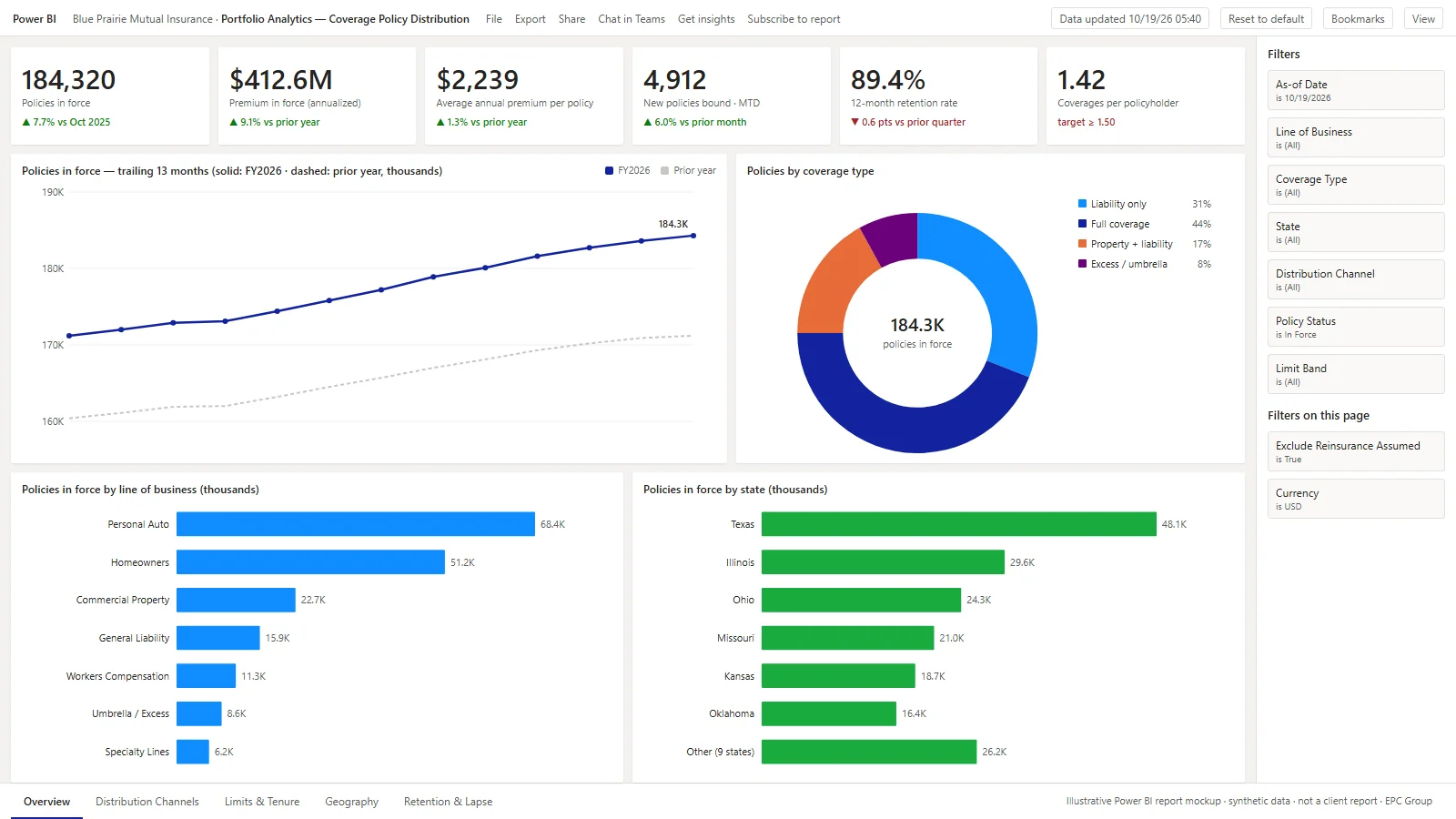
- Six KPI cards answer the first questions a distribution executive asks: policies in force, annualized premium in force, average premium per policy, new policies bound this month, twelve-month retention and coverages per policyholder.
- Trailing 13-month trend plots policies in force against the prior year so growth and seasonality read at a glance.
- Coverage type, line of business and state breakdowns all use the same policies-in-force measure, so every visual reconciles to the headline number.
- Filter pane carries as-of date, line of business, coverage type, state, distribution channel, policy status and limit band; page-level filters exclude assumed reinsurance and pin the currency.
Page 2 — Distribution channels: who is producing, and how well it sticks
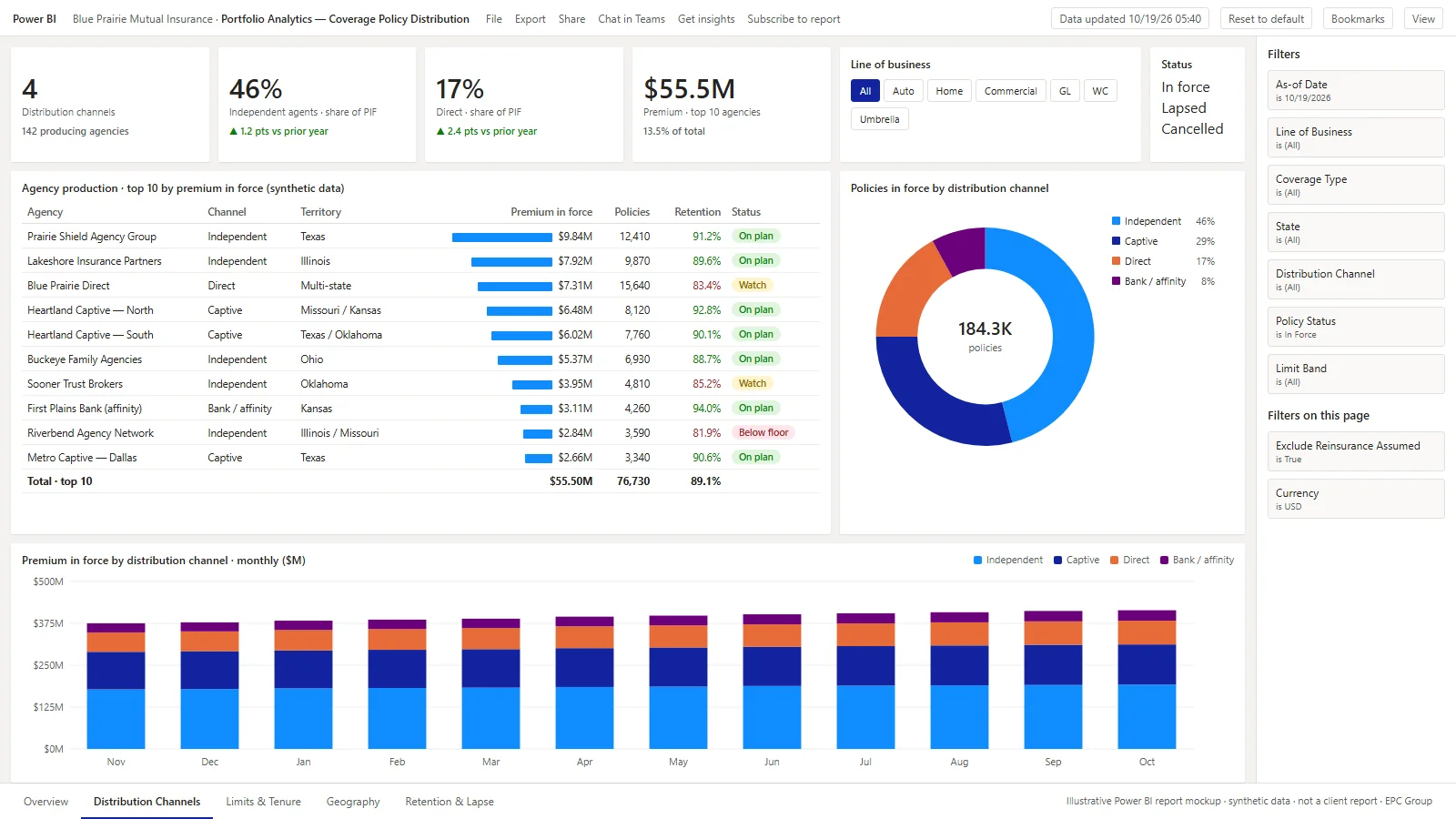
- A matrix with data bars and conditional formatting: premium in force, policy count, retention (green at or above the floor, red below) and a plan-status tag per agency.
- Line-of-business and status slicers re-cut the matrix without leaving the page; the channel donut cross-filters it.
- The stacked monthly column chart shows premium in force by channel so a shift from captive to direct is seen as it happens, not at renewal season.
- In production this page carries row-level security so a regional sales manager sees only their agencies while the chief distribution officer sees all of them — the same report, one semantic model.
Page 3 — Limits and tenure: how the book is composed
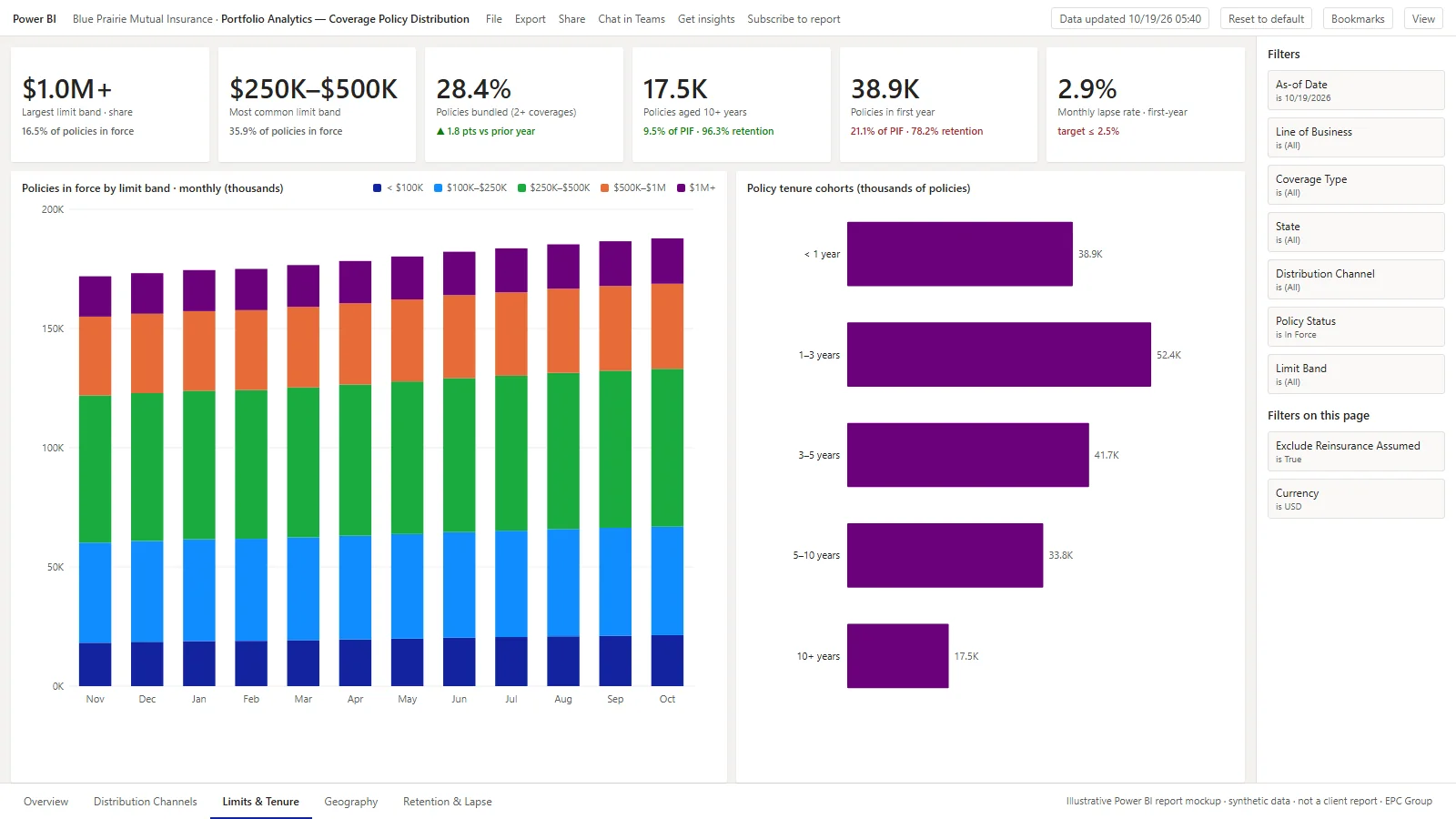
- The limit-band stacked columns show the composition of the book month by month, so growth in the $1M+ band is visible separately from growth overall.
- Tenure cohorts pair with their retention rates in the KPI cards: the first-year cohort is the largest and the leakiest, which is where the lapse target sits.
- Bundling rate (policyholders with two or more coverages) is the cross-sell measure the page is built to move.
How a report like this is built
Sources
The policy administration system (policy, coverage, limit and status events), the billing platform for premium in force and lapse, the agency management or producer system for channel and agency attribution, and a date table.
Model
A star schema with one fact table per grain (policies in force by day, premium transactions, policy events) and conformed dimensions for date, line of business, coverage, state, channel, agency and limit band; measures for in-force counts, premium, retention and bundling.
Governance
Row-level security by territory and agency, sensitivity labels on the semantic model, a certified dataset so every page reconciles, and a refresh schedule tied to the policy-administration nightly batch.
Related reading: financial services industry practice, financial services Power BI and the Power BI consulting service.
Frequently Asked Questions
What does the Coverage Policy Distribution report show?
Three report pages: an Overview with policies in force, premium in force, average premium, new policies bound, retention and coverages per policyholder, plus trend and breakdowns by coverage type, line of business and state; a Distribution Channels page with an agency production matrix, channel mix and monthly premium by channel; and a Limits and Tenure page with limit-band composition and policy tenure cohorts.
Is the data on these screenshots real?
No. Every figure, agency, territory and name is synthetic. The mockups are rendered from fictional data for a fictional carrier, Blue Prairie Mutual Insurance, so the page can show the report design without exposing any client's book of business.
What data sources feed a report like this?
A policy administration system for policy, coverage, limit and status events; the billing platform for premium in force and lapse; an agency management or producer system for channel and agency attribution; and a date table. Carriers on Guidewire, Duck Creek, Majesco or a legacy mainframe policy system have all fed this design.
How does EPC Group price an insurance portfolio dashboard like this?
As a fixed fee quoted after a 30-minute scoping call. EPC Group does not publish price ranges. The scope drivers are the number of source systems, the number of lines of business and the row-level security model the carrier needs.
Power BI Strategy: 2026 Considerations for Power BI Report Samples Power BI Coverage Policy Distribution
Power BI Copilot grounds itself on the semantic model, NOT the underlying source data. That means Copilot answers are only as accurate as the DAX measure definitions, the field metadata (display folders, descriptions, hierarchies), and the synonyms taxonomy. In practice, the difference between a Copilot deployment that analysts keep using and one they abandon is whether the semantic model was Copilot-prepared: measure descriptions written, synonyms defined, and hierarchies and display folders curated before the first prompt is typed.
Power BI capacity sizing in 2026 starts with the F-SKU economics: F2 ($263/mo) covers small workloads within a 3 GB Direct Lake model-memory limit (Microsoft Learn, Direct Lake overview, read 2026-10-22), F4 ($526/mo) handles a typical mid-market deployment with semantic-model refresh windows under 10 minutes, and F64 (~$8,410/mo (PAYG)) is the sweet spot for enterprises consuming Power BI alongside Microsoft Fabric data engineering, lakehouse storage, and real-time intelligence. Capacity right-sizing should be revisited every 90 days because Microsoft adjusts F-SKU memory allocations, paginated report performance, and Direct Lake mode availability with each major service update.
Decision factors EPC Group evaluates
- License optimization audit (Pro vs Premium Per User vs F-SKU)
- Row-level security via service principal authentication
- Capacity sizing decision (F2/F4/F64+) tied to peak concurrent users and refresh window
- Copilot grounding quality assessment of semantic-model metadata
- Direct Lake mode adoption for Fabric-resident semantic models
See related EPC Group services or schedule a discovery call.