
SharePoint Site Usage — Power BI Report Sample
A three-page Power BI report sample for SharePoint site usage, shown as mockups rendered from synthetic data: an Overview of sites, monthly active users, page views, storage and inactive sites; a Site Inventory page with owners, activity, storage and lifecycle status per site; and an Adoption and Lifecycle page with active users by hub and the site lifecycle funnel. It is for intranet owners and Microsoft 365 administrators deciding how to measure whether SharePoint is being used and which sites to archive. No client data appears on the page; every site, owner and figure is fictional.
Key Facts
- Microsoft enterprise consulting since 1997; 6,500+ SharePoint and 1,500+ Power BI deployments.
- Compliance-native delivery across HIPAA, SOC 2, FedRAMP, FINRA, CMMC, and GxP environments.
- Microsoft Solutions Partner with experience across core current designations.
- Senior architect named on every engagement Statement of Work.
- Engagement Operating Model: published seven-phase Microsoft project management methodology.
- Free initial consultation; fixed-fee scoped Statements of Work.
Last updated by Errin O'Connor, Founder & Chief AI Architect, EPC Group
This sample is a three-page adoption report built the way EPC Group builds them for Microsoft 365 tenants: one Overview page an intranet owner or M365 service owner reads in a minute, one page per operating question underneath it. The screenshots below are mockups rendered from synthetic data for a fictional tenant (Fabrikam Industries); no client data appears on this page.
Page 1 — Overview: how much of SharePoint is actually used
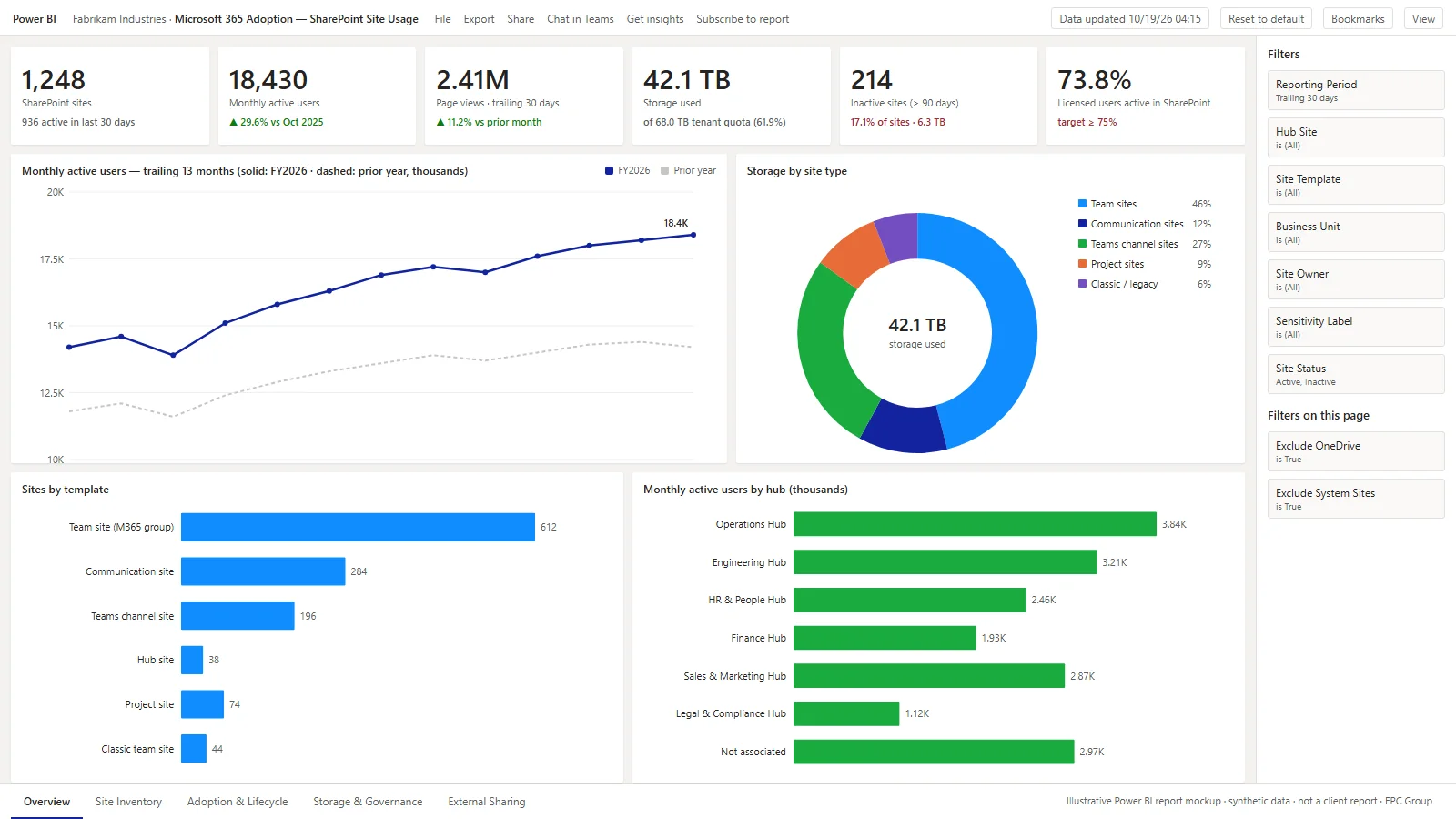
- Six KPI cards answer the first questions a service owner asks: total sites and how many were active in the last 30 days, monthly active users, page views, storage against the tenant quota, inactive sites past 90 days and the share of licensed users who touched SharePoint.
- Trailing 13-month trend plots monthly active users against the prior year so an intranet relaunch or a Teams rollout shows up as a step, not a rumor.
- Storage by site type, sites by template and users by hub share the same site dimension, so every visual reconciles to the headline counts.
- Filter pane carries reporting period, hub site, template, business unit, owner, sensitivity label and status; page-level filters exclude OneDrive and system sites.
Page 2 — Site inventory: which sites, whose, and are they alive
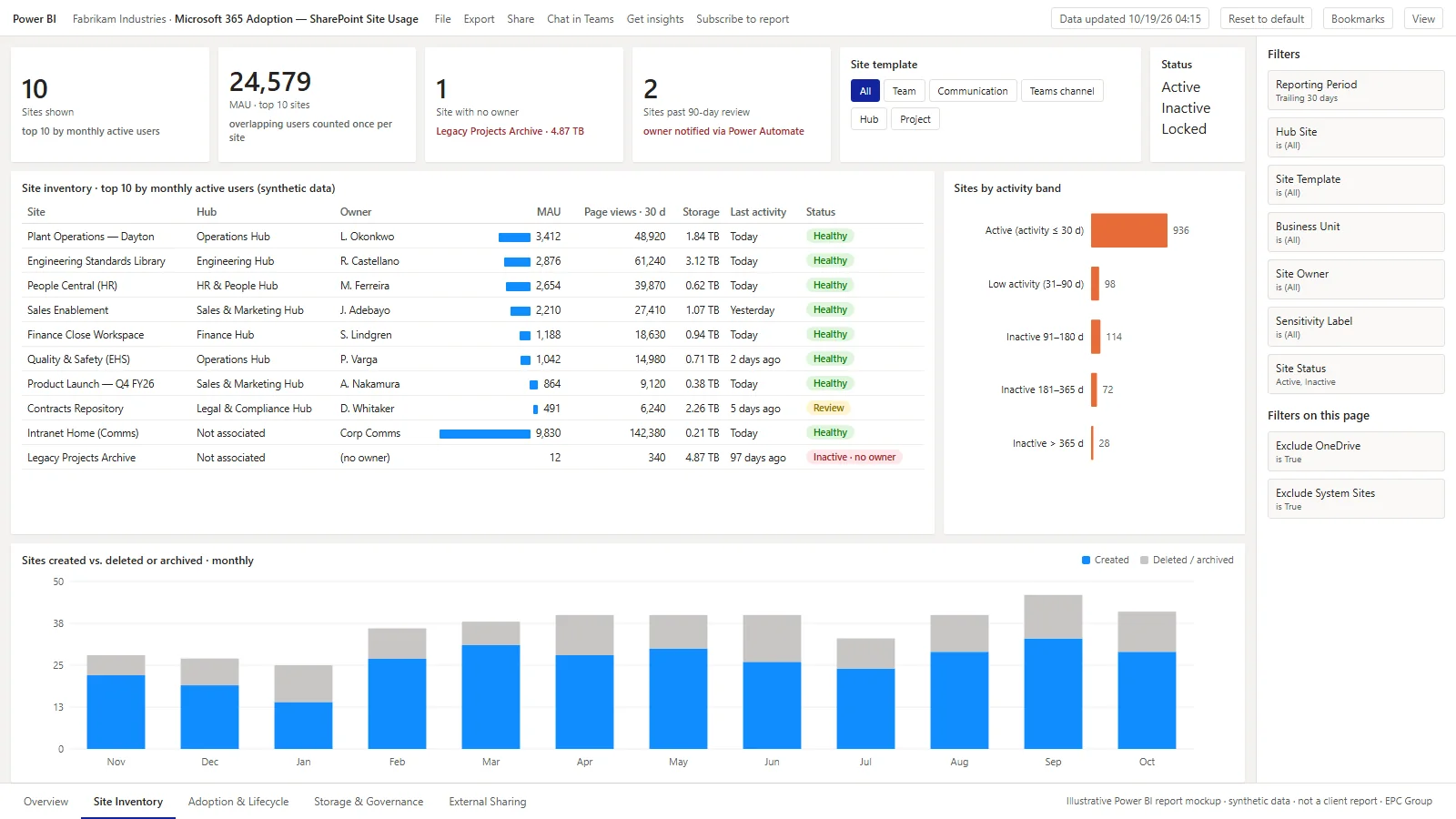
- A matrix with data bars and status tags: monthly active users, 30-day page views, storage, last activity and a health tag per site — including the ownerless archive that is quietly holding the most storage.
- Template and status slicers re-cut the inventory without leaving the page; the activity-band bar chart cross-filters it.
- Sites created versus deleted or archived by month shows whether provisioning governance is keeping pace with sprawl.
- In production the inactive-site rows drive a Power Automate owner-attestation flow; the report is the evidence the flow acts on.
Page 3 — Adoption and lifecycle: are new sites surviving
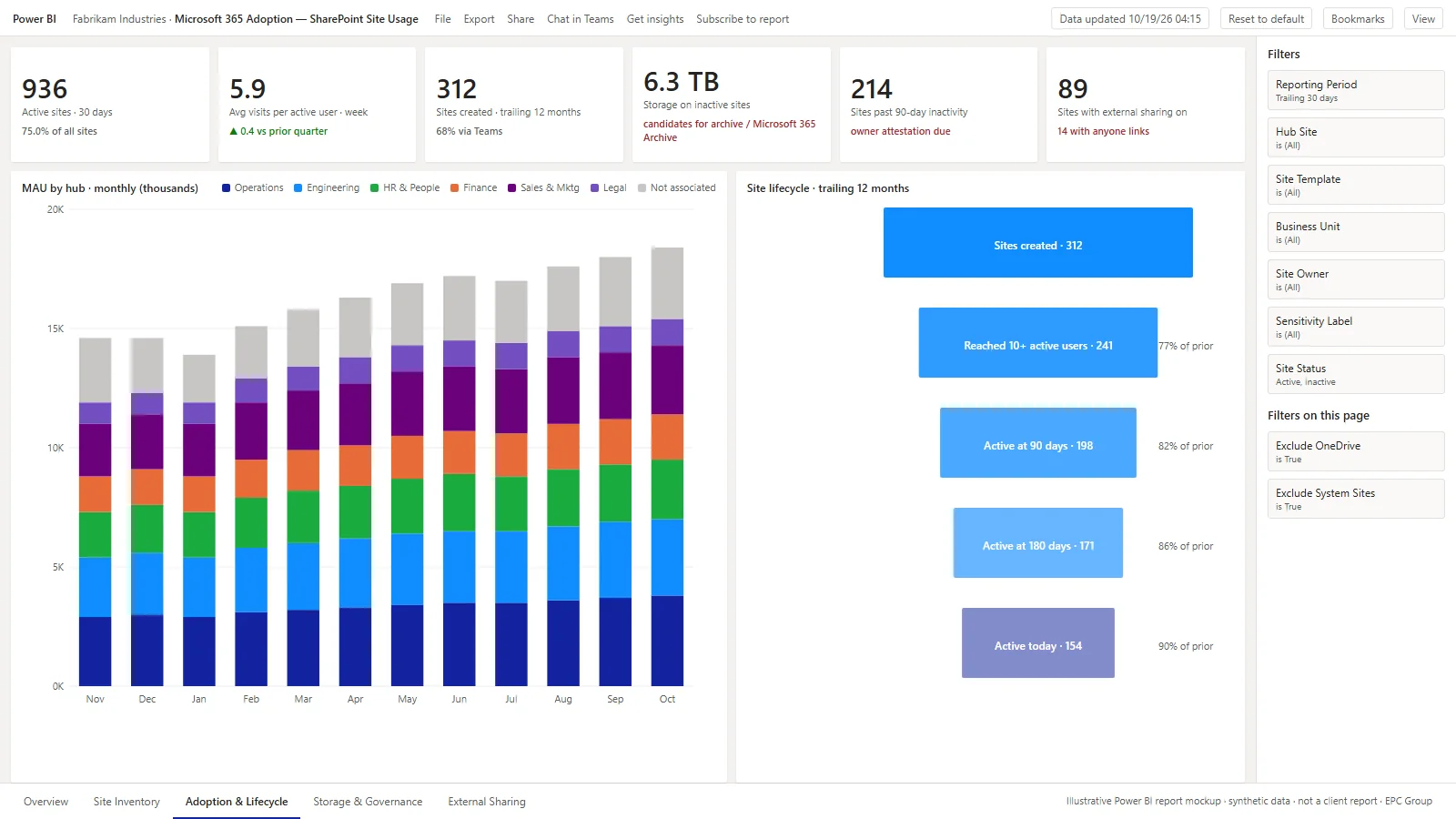
- The stacked monthly columns show active users by hub, so the hub that is growing and the one that is flat are both visible without a slicer.
- The site lifecycle funnel follows the sites created in the trailing twelve months from creation to ten active users, to 90 and 180 days, to today — the survival rate provisioning policy should be judged on.
- External sharing and anyone links appear beside storage on inactive sites because the two lists overlap more often than owners expect.
How a report like this is built
Sources
Microsoft Graph usage reports (SharePoint site usage and activity), the SharePoint admin center site inventory, Microsoft 365 group and Teams membership for ownership, Purview sensitivity labels and sharing settings, and a date table.
Model
A star schema with one fact table per grain (daily site usage, monthly active users, site events) and conformed dimensions for date, site, hub, template, owner, business unit and label; measures for active sites, active users, page views, storage and lifecycle survival.
Governance
Row-level security by business unit so each department owner sees their own sites, a certified dataset refreshed from Graph nightly, and retention of the usage history beyond the 180 days Microsoft keeps.
Related reading: SharePoint consulting service, SharePoint governance best practices and the Microsoft 365 adoption and change management.
Frequently Asked Questions
What does the SharePoint Site Usage report show?
Three report pages: an Overview with sites, active sites, monthly active users, page views, storage, inactive sites and the share of licensed users active, plus trend and breakdowns by site type, template and hub; a Site Inventory page with a per-site matrix (owner, active users, page views, storage, last activity, status) and provisioning versus deletion by month; and an Adoption and Lifecycle page with active users by hub and a site lifecycle funnel.
Is the data on these screenshots real?
No. Every site name, owner, figure and hub is synthetic. The mockups are rendered from fictional data for a fictional tenant, Fabrikam Industries, so the page can show the report design without exposing any client's tenant.
Where does SharePoint usage data come from?
Microsoft Graph usage reports (getSharePointSiteUsageDetail and the activity reports), the SharePoint admin center site list, Microsoft 365 group membership for ownership, and Purview for sensitivity labels and sharing settings. Microsoft keeps only 180 days of usage history, so the report lands it in a warehouse or Fabric lakehouse to keep the trend.
How does EPC Group price a SharePoint adoption dashboard like this?
As a fixed fee quoted after a 30-minute scoping call. EPC Group does not publish price ranges. The scope drivers are tenant size, whether usage history is already being retained, and the ownership and row-level security model the organization needs.
Power BI Strategy: 2026 Considerations for Power BI Report Samples SharePoint Site Usage Sample
Power BI Copilot grounds itself on the semantic model, NOT the underlying source data. That means Copilot answers are only as accurate as the DAX measure definitions, the field metadata (display folders, descriptions, hierarchies), and the synonyms taxonomy. In practice, the difference between a Copilot deployment that analysts keep using and one they abandon is whether the semantic model was Copilot-prepared: measure descriptions written, synonyms defined, and hierarchies and display folders curated before the first prompt is typed.
Power BI capacity sizing in 2026 starts with the F-SKU economics: F2 ($263/mo) covers small workloads within a 3 GB Direct Lake model-memory limit (Microsoft Learn, Direct Lake overview, read 2026-10-22), F4 ($526/mo) handles a typical mid-market deployment with semantic-model refresh windows under 10 minutes, and F64 (~$8,410/mo (PAYG)) is the sweet spot for enterprises consuming Power BI alongside Microsoft Fabric data engineering, lakehouse storage, and real-time intelligence. Capacity right-sizing should be revisited every 90 days because Microsoft adjusts F-SKU memory allocations, paginated report performance, and Direct Lake mode availability with each major service update.
Decision factors EPC Group evaluates
- License optimization audit (Pro vs Premium Per User vs F-SKU)
- Row-level security via service principal authentication
- Capacity sizing decision (F2/F4/F64+) tied to peak concurrent users and refresh window
- Copilot grounding quality assessment of semantic-model metadata
- Direct Lake mode adoption for Fabric-resident semantic models
For a tailored read on this topic in your specific tenant, contact EPC Group at contact@epcgroup.net or +1 (888) 381-9725. See pricing and engagement models.