
By Errin O'Connor, founder of EPC Group (Microsoft consulting since 1997). Web edition, published November 9, 2026. The operating model behind this paper is the BYOAI governance framework; the readiness check is the TAR-8 eight-surface standard.
What is BYOAI, and why was device management never built for it?
BYOAI is AI that reads, summarizes or acts on corporate data without the organization having licensed it. Microsoft and LinkedIn used the term in the 2024 Work Trend Index, which found that 78% of AI users were bringing their own AI tools to work (Microsoft Work Trend Index, May 8, 2024). Two years later the pattern has two new fronts: the AI built into the phone's operating system, and personal agents that join meetings.
Mobile device management answers one question: is this device compliant? BYOAI needs four different answers: which identity is consenting to which app (Entra ID), which app holds the corporate content (Intune app protection), which data may leave a prompt box (Purview), and which agents may sit in a meeting (Teams, Zoom and Google Meet policy). The BYOAI governance framework sets out the operating model; this paper is the field guide to the two fronts where it is being tested first. For the audit playbook see the shadow AI amnesty audit, and for discovery see agent sprawl and shadow AI discovery. The LinkedIn edition of this paper is BYOD, BYOAI: Your Employees Are Bringing Their Own AI and Handing It the Keys (Errin O'Connor, November 9, 2026).
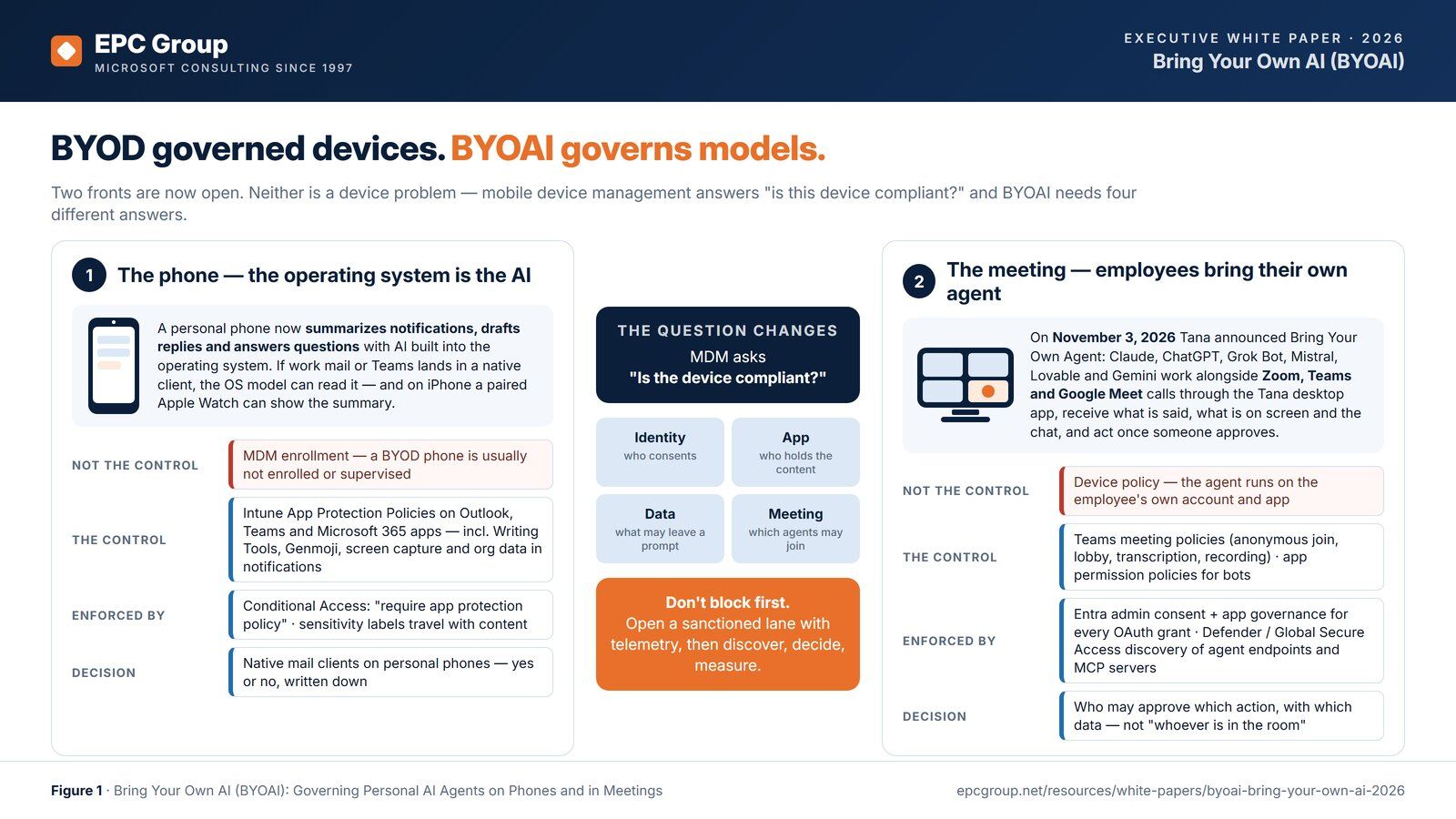
How does BYOAI reach corporate data on a personal phone?
Phone operating systems now ship their own AI. On iPhone, Apple Intelligence writes, summarizes mail and summarizes notifications, and Apple lists notification summaries on an Apple Watch paired with an Apple Intelligence-enabled iPhone (Apple Support). If corporate mail or Teams messages land in a native client on that phone, the operating system's model can read them.
Apple's device-management restrictions for Writing Tools, Genmoji, Image Playground and Mail summaries require a supervised device (Apple restrictions for iPhone and iPad), and Apple's newer Apple Intelligence declarative configuration for iOS 26.4 and later also requires supervision and is offered through Automated Device Enrollment (Apple declarative configuration). A personally owned phone is usually in User Enrollment, where the AI restriction Apple lists forces external intelligence integrations into anonymous mode (Apple User Enrollment). We found no Apple control for notification summaries on either restrictions page.
The dependable BYOAI control on a personal phone is therefore the app policy, not the device policy, and the same logic applies to Android: Intune app protection policies on Outlook, Teams and the Microsoft 365 apps (Intune data protection framework). On iOS those policies can now block Writing Tools, Genmoji and screen capture (which includes Siri onscreen awareness) for work data, and the Org data notifications setting can keep work data out of notifications on the phone and on connected devices such as a watch, in apps that support those settings (Microsoft Learn). Add a Conditional Access policy with the Require app protection policy grant, because Microsoft lists the older approved client app grant as retiring in early March 2026 and tells admins to use only the app protection policy grant in new policies (Microsoft Learn); sensitivity labels that travel with the content; and a written yes-or-no decision about native mail clients. See Intune for corporate and BYOD devices, Intune for macOS, iOS and Android, iPhone, Apple Intelligence and the move from BYOD to BYOAI, and what Microsoft 365 Copilot can see.
What happens when employees bring their own agent to a meeting?
On November 3, 2026 Tana announced Bring Your Own Agent: participants connect agents they already use (Claude, ChatGPT, Grok Bot, Mistral, Lovable and Gemini at launch) to Zoom, Microsoft Teams and Google Meet calls through the Tana desktop app; the agent receives what is said, what is on screen and the meeting chat, and does the work once someone approves (Tana press release). The product is one example; the BYOAI pattern is the point. A personal agent in a corporate meeting carries its own connectors, skills and memory, and the organization's meeting policy, app policy and acceptable-use decision, not its device policy, decide whether that is allowed. Capture that runs locally on a participant's own computer is outside Teams' technical control, so the policy has to name it.
The controls that reach this front already exist in Microsoft 365: Teams meeting policy settings for anonymous join, lobby bypass, recording and transcription (Teams settings reference); Teams app permission policies, or app centric management in tenants that have moved to it, for bots and meeting apps (Microsoft Learn); the Entra ID admin consent workflow and app governance in Defender for Cloud Apps for any OAuth grant an agent requests against Microsoft Graph (admin consent workflow, app governance); and discovery for the agents' own endpoints. Microsoft's shadow AI discovery in Global Secure Access names AI chatbots, AI model provider APIs and SaaS MCP servers (Microsoft Learn). Zoom and Google Meet are governed in their own admin consoles, so a BYOAI meeting policy has to name all three. See Microsoft Teams governance, Microsoft Entra ID consulting, agentic AI governance and Copilot Studio agent governance.
Why is BYOAI also a measurement problem?
Many leadership teams can state what they spent on sanctioned AI licenses and cannot state what came back, partly because AI-assisted work done on personal accounts and devices produces no telemetry the organization can see. The sanctioned investment is measured against a denominator that leaves that work out. The fix is not another survey; it is a sanctioned lane people prefer, instrumented from day one, so governance and measurement arrive together. See stopping shadow AI with Microsoft Purview, the Copilot ROI measurement framework and the virtual Chief AI Officer service.
What are the 7 BYOAI signals, and which Microsoft control covers each?
The seven signals are a practical screening framework for the decisions an executive team has to make, not a certification or a statistical prediction of breach likelihood. Each names the question, the control plane and the evidence an auditor would ask for. Signals 4, 5 and 6 (connectors and consent, authority to act, evidence and incident response) are priority: a serious gap in any of them needs attention whatever the total score.
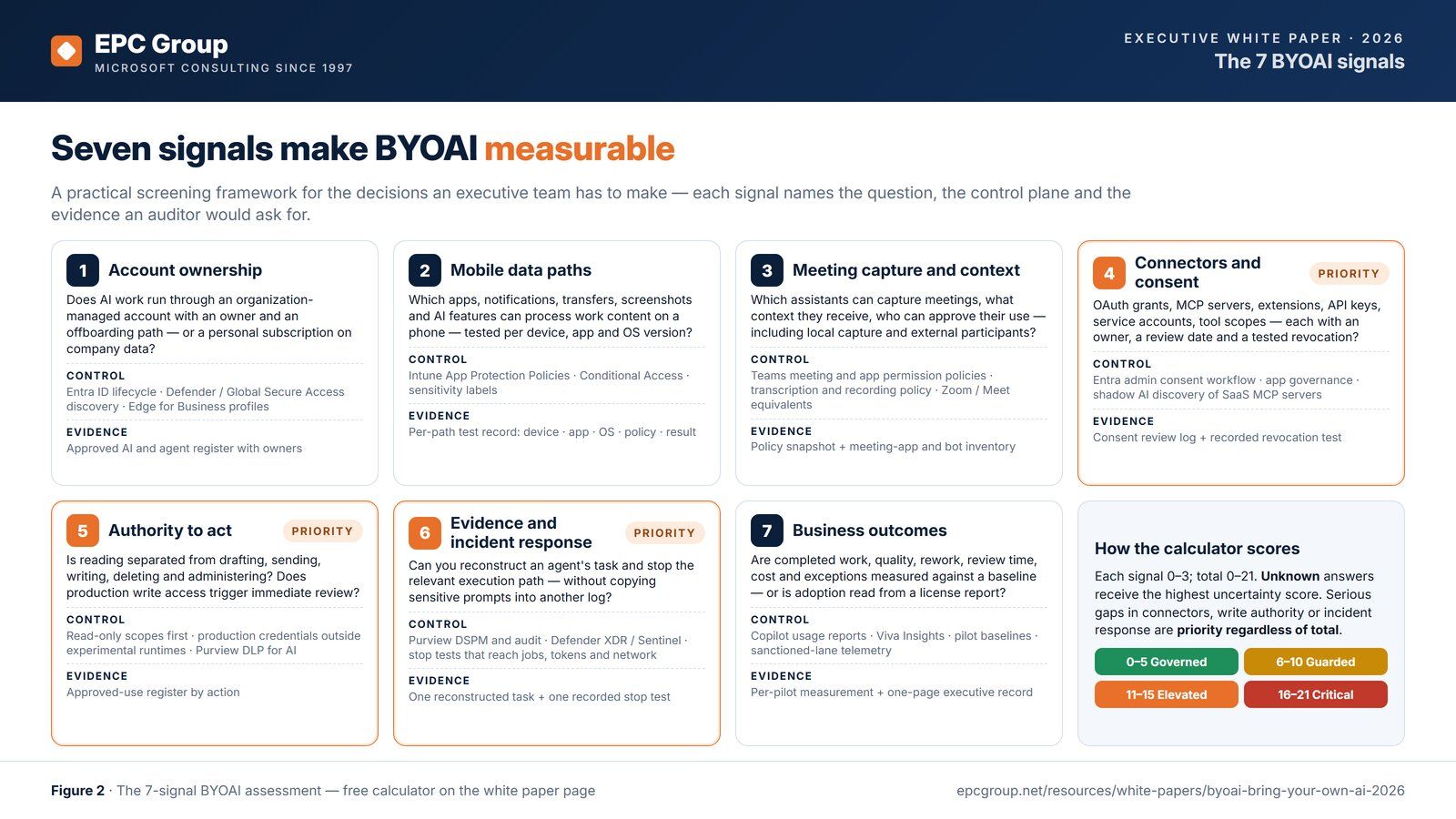
| Signal | Where it happens | Control plane | Microsoft control | Evidence artifact | Source |
|---|---|---|---|---|---|
| 1. Account ownership | Personal and organization-managed accounts | Identity and lifecycle | Entra ID managed accounts with owners and offboarding for sanctioned tools; Defender for Cloud Apps generative AI discovery (unsanctioned apps are blocked on devices onboarded to Defender for Endpoint); Global Secure Access shadow AI discovery; Edge for Business work profile. | Approved AI and agent register with owners and offboarding paths | Learn |
| 2. Mobile data paths | iPhone, Android, paired watch | App protection and labels | Intune app protection policies: data transfer, org data in notifications, and on iOS the Writing Tools, Genmoji and screen capture settings; the Conditional Access Require app protection policy grant; sensitivity labels; Apple Intelligence restrictions only on supervised devices. | Per-path test record: device, app, OS version, policy, result | Learn |
| 3. Meeting capture and context | Teams, Zoom, Google Meet, local capture | Meeting and app policy | Teams meeting policy settings for anonymous join, lobby bypass, recording and transcription; app permission policies or app centric management for bots and meeting apps; Zoom and Meet admin settings. | Policy snapshot; meeting-app and bot inventory; capture paths outside technical control named | Learn |
| 4. Connectors and consent (priority) | Entra ID, MCP servers, extensions, API keys | Consent governance | User consent settings and the admin consent workflow; app governance in Defender for Cloud Apps; Global Secure Access discovery of SaaS MCP servers; Edge extension allow and block lists. | Consent review log; credential owners and review dates; recorded revocation test | Learn |
| 5. Authority to act (priority) | Every connector and runtime | Least privilege by action | Read-only scopes first; production credentials kept out of experimental runtimes; Purview DLP for AI apps; approvals that name the target, change, data and person. | Approved-use register by action (read, draft, send, write, delete, administer) | Learn |
| 6. Evidence and incident response (priority) | Agent runtimes and connectors | Audit and termination | Purview DSPM and audit; Defender XDR and Microsoft Sentinel; stop tests that reach the session, running jobs, connector credentials and network access. | One reconstructed task and one recorded stop test, dated | Learn |
| 7. Business outcomes | Pilots and board reporting | Measurement | The Microsoft Copilot usage report; the Copilot Dashboard in Viva Insights; pilot baselines; sanctioned-lane telemetry. | Completed work, quality, rework, review time, cost and exceptions per pilot; the one-page executive record | Learn |
Microsoft's own deployment model for shadow AI has four steps: discover AI apps, block access to unsanctioned AI apps, block sensitive data going to sanctioned AI apps, and govern data sent to AI apps, using Purview, Defender for Cloud Apps, Entra and Intune (Microsoft Learn). The seven signals map onto it. Check licensing and rollout before relying on a control: blocking sensitive information in Microsoft 365 Copilot prompts is in preview and DLP does not scan files uploaded directly into prompts (Microsoft Learn); DLP for cloud apps in Edge for Business has its own device and browser requirements (Microsoft Learn); and network data security, which covers browsers, apps and add-ins, needs specific Purview and Entra Internet Access licenses (Microsoft Learn). Purview Data Security Posture Management gives one view of data risk across traditional and AI apps (Microsoft Learn). See how to prevent data loss in generative AI deployments.
Why should the same agent have different authority in different jobs?
Approval by product is too coarse. A platform can be suitable for one account, dataset and action while needing more controls for another, so the boundary is defined by action (reading, drafting, sending, writing, deleting, administering), not by vendor logo. Three illustrative BYOAI workflows show the pattern.
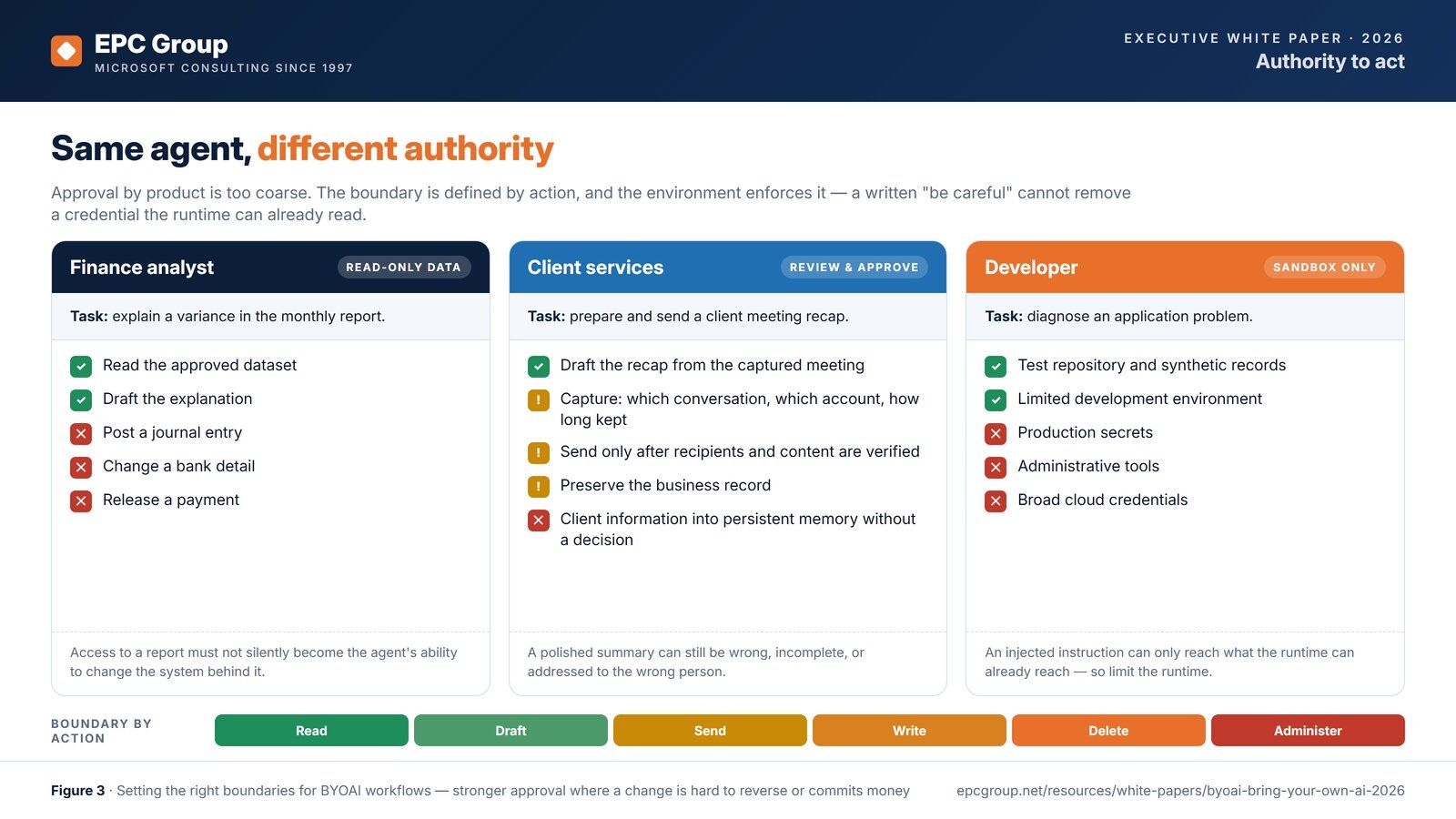
- Finance analyst: read-only data. Explaining a variance needs an approved dataset and permission to draft. Posting a journal entry, changing a bank detail or releasing a payment is materially different authority, with its own approvals and enforcement.
- Client services: review and approve. A meeting recap needs decisions about which conversation may be captured, which account receives it, how long it is kept and whether client information enters persistent memory; sending it needs recipient and content verification and a preserved business record.
- Developer: sandbox only. A test repository, synthetic records and a limited environment usually provide everything needed; production secrets, administrative tools and broad cloud credentials raise the consequence of an error or an injected instruction. The environment enforces the limit: a written “be careful” cannot remove a credential the runtime can already read.
See Copilot Studio agent governance, agentic AI governance and Microsoft Entra ID consulting.
Why run TAR-8 before a BYOAI amnesty?
BYOAI governance fails when it is bolted onto a tenant that is not ready for sanctioned AI either. TAR-8, EPC Group's eight-surface tenant AI readiness standard, scores identity, sensitive data, content, conversations, reports, business applications, infrastructure and ownership, each 0 to 3 against the artifact an auditor asks for, before any model is allowed to read tenant data. The seven BYOAI signals land on those same surfaces, so a TAR-8 result is the baseline the 30-Day Amnesty Audit measures against. Start with the TAR-8 readiness assessment or read the TAR-8 standard.
How does the 30-Day Amnesty Audit work?
- Days 1–7: establish the approved lane. Name an executive sponsor and a delivery owner. Define the permitted data and actions. Review urgent exposures and disable an exposed credential now rather than waiting. Publish the intake route, open the disclosure window on terms set by leadership, HR and legal, and start a small number of useful pilots with a baseline measure. The approved lane includes Microsoft Copilot Chat for work accounts under enterprise data protection (Microsoft Learn), one sanctioned agent entry point (Copilot Studio or Microsoft Foundry) with an owner, and Purview DLP for AI apps in audit mode. Nothing is blocked yet; audit-only DLP is for tuning, not permission to continue a known leak.
- Days 8–14: map actual use. Application discovery (Defender for Cloud Apps, Global Secure Access), identity and consent records, device and browser configuration, meeting applications, agent packages and employee disclosures, recording what each source can and cannot observe.
- Days 15–21: test the boundaries. With synthetic examples, test protected-data transfers, notification content, connector scopes, write permissions, approval requirements and revocation. Record expected and actual results, and give each failed control an owner and a remediation date.
- Days 22–30: decide and measure. Approve, restrict, migrate or retire each use case; revoke obsolete access; compare pilot outcomes with the baseline; and produce a short executive record of residual exposure, useful workflows, evidence gaps and the next decisions required, with an AI acceptable-use addendum (policy template).
Thirty days establishes a baseline and addresses priority gaps; it does not guarantee complete discovery, enterprise-wide deployment or regulatory compliance. The scoping call sets what EPC Group runs in those thirty days and what stays with your team.
The BYOAI control baseline: EPC Group's Intune practice
Signal 2, mobile data paths, and the extension side of signal 4 are closed by endpoint and app management, and that is EPC Group's Intune practice: app protection policies on the Microsoft 365 apps, including the iOS Writing Tools, Genmoji, screen capture and notification settings, Conditional Access with the Require app protection policy grant, Edge extension allow and block lists (Microsoft Learn), application control, Defender for Endpoint, and coverage for Windows, macOS, iOS and Android. The BYOAI baseline is delivered as a scoped Intune engagement, with the policy exports as the acceptance artifact. See Microsoft Intune consulting, Intune and Defender for Endpoint for zero trust and the three-campus Intune case study (2023).
The BYOAI operating model: EPC Group's AI governance practice
Signals 1, 3, 4, 5, 6 and 7 are governance decisions with technical enforcement: which accounts, models and agents are sanctioned, who may consent, what an agent may do, which agents may sit in a meeting, how a task is reconstructed and stopped, and how the result is measured. EPC Group's AI governance practice writes the operating model (decision rights, the sanctioned-lane catalogue, the agent register, the DLP posture and the board readout) and wires it to Purview, Entra, Teams and Defender so the policy and the control are the same artifact. The model uses three lanes: Green (approved accounts, data and actions), Yellow (allowed with controls and review) and Red (not permitted), so an employee can find the relevant permission without decoding a long policy. See AI governance consulting, the enterprise AI governance framework white paper, Microsoft Purview consulting and the regional bank Copilot governance case study (2024).
Score your organization on the 7 BYOAI signals
Seven questions, about three minutes. Each signal scores 0 to 3 for a total of 0 to 21; an unknown answer scores 3, and a gap in connectors, authority to act or incident response is flagged as priority whatever the total. Your answers stay in your browser; nothing is sent anywhere.
0 of 7 answered
Answer all seven to see your score, your band and any priority gaps. An unknown answer scores 3; a gap in connectors, authority to act or incident response is priority whatever the total.
Primary sources
- AI at Work Is Here. Now Comes the Hard Part (2024 Work Trend Index, May 8, 2024) — Microsoft and LinkedIn, accessed 2026-11-09
- Tana launches Bring Your Own Agent to the meeting (press release, November 3, 2026) — Tana, accessed 2026-11-09
- Prevent data leak to shadow AI (deployment model) — Microsoft Learn, accessed 2026-11-09
- Shadow AI discovery in Global Secure Access — Microsoft Learn, accessed 2026-11-09
- Manage generative AI apps for your organization (Defender for Cloud Apps) — Microsoft Learn, accessed 2026-11-09
- Microsoft Purview Data Security Posture Management (DSPM) — Microsoft Learn, accessed 2026-11-09
- Data Loss Prevention for cloud apps in Edge for Business — Microsoft Learn, accessed 2026-11-09
- Network data security (browsers, apps and add-ins) — Microsoft Learn, accessed 2026-11-09
- DLP for Microsoft 365 Copilot and Copilot Chat — Microsoft Learn, accessed 2026-11-09
- Data protection framework using app protection policies (Intune) — Microsoft Learn, accessed 2026-11-09
- iOS/iPadOS app protection policy settings (Writing Tools, Genmoji, screen capture, org data notifications) — Microsoft Learn, accessed 2026-11-09
- Conditional Access grant controls (approved client app grant retiring; use Require app protection policy) — Microsoft Learn, accessed 2026-11-09
- Configure the admin consent workflow (Microsoft Entra ID) — Microsoft Learn, accessed 2026-11-09
- App governance in Defender for Cloud Apps — Microsoft Learn, accessed 2026-11-09
- Teams settings and policies reference (meeting policies) — Microsoft Learn, accessed 2026-11-09
- Teams app permission policies and app centric management — Microsoft Learn, accessed 2026-11-09
- Use policies to manage Microsoft Edge extensions — Microsoft Learn, accessed 2026-11-09
- Microsoft Copilot usage report — Microsoft Learn, accessed 2026-11-09
- Enterprise data protection in Microsoft Copilot and Microsoft Copilot Chat — Microsoft Learn, accessed 2026-11-09
- Device management restrictions for iPhone and iPad devices — Apple Platform Deployment, accessed 2026-11-09
- Apple Intelligence declarative configuration for Apple devices — Apple Platform Deployment, accessed 2026-11-09
- Device management service User Enrollment information — Apple Platform Deployment, accessed 2026-11-09
- Apple Intelligence features and supported devices — Apple Support, accessed 2026-11-09
BYOAI: frequently asked questions
What is BYOAI (Bring Your Own AI)?
BYOAI is the use of AI the organization did not license to read, summarize or act on corporate data: the model built into a personal phone, a personal ChatGPT, Claude or Gemini account, a browser extension or desktop agent, or a personal agent brought into a meeting. Microsoft and LinkedIn used the term in the 2024 Work Trend Index for AI users bringing their own AI tools to work. BYOD asked who owns the device; BYOAI asks which model reads the data, so EPC Group governs it through identity, app protection, data protection and meeting policy rather than device management.
How is BYOAI different from shadow AI?
Shadow AI is the general category of unsanctioned AI use. BYOAI is the part of it that arrives attached to something the employee already brings: their phone (on-device AI), their laptop (extensions and desktop agents) or their own agent in a meeting. The distinction matters because the controls differ. Shadow AI is found by discovery; BYOAI is governed by Intune app protection policies, Conditional Access, meeting and app policies, and consent policies.
What is Bring Your Own Agent in Teams, Zoom and Google Meet?
On November 3, 2026 Tana announced Bring Your Own Agent, which connects agents people already use (Claude, ChatGPT, Grok Bot, Mistral, Lovable and Gemini at launch) to Zoom, Microsoft Teams and Google Meet calls through the Tana desktop app. The agent receives what is said, what is on screen and the meeting chat, and does the work once someone approves. It is one product, but it makes the BYOAI meeting pattern concrete: a personal agent with its own connectors and memory inside a corporate meeting, governed by meeting, app and consent policy rather than by device management.
Can Intune stop on-device AI from reading corporate mail and Teams messages on a BYOD phone?
Partly, and through the app rather than the device. Intune app protection policies for iOS can block Writing Tools, Genmoji and screen capture (which includes Siri onscreen awareness) for work data, and the Org data notifications setting can keep work data out of notifications on the phone and on connected devices such as a watch, in apps that support those settings. Apple’s own Apple Intelligence restrictions apply only to supervised devices, and a personal phone in User Enrollment is not supervised. Add a Conditional Access policy with the Require app protection policy grant, sensitivity labels that travel with the content, and a written decision about native mail clients. EPC Group’s Intune practice deploys this baseline.
What are the 7 BYOAI risk signals?
Account ownership; mobile data paths; meeting capture and context; connectors and consent; authority to act; evidence and incident response; and business outcomes. Each signal maps to a control plane and an evidence artifact. It is a practical screening framework, not a certification or a statistical prediction of breach likelihood. In the calculator on this page an unknown answer scores 3, the highest uncertainty, and a serious gap in connectors, authority to act or incident response is flagged as priority whatever the total.
How do TAR-8 and the 30-Day Amnesty Audit fit together?
TAR-8 is EPC Group’s eight-surface tenant AI readiness standard: identity, sensitive data, content, conversations, reports, business applications, infrastructure and ownership, each scored 0 to 3 against evidence. It tells you whether the tenant is ready for sanctioned AI. The 30-Day Amnesty Audit is the BYOAI program that runs on top of it: days 1 to 7 establish the approved lane and open the disclosure window, days 8 to 14 map actual use, days 15 to 21 test the boundaries, and days 22 to 30 decide and measure. A BYOAI engagement is quoted as a fixed fee after a one-hour call with a senior architect; EPC Group does not publish price ranges.
Talk to a senior architect about BYOAI
A one-hour call with a senior EPC Group architect covers your seven BYOAI signals, where TAR-8 stands, and what the first week of a Green-Lane Sandbox looks like in your tenant. A BYOAI engagement is quoted as a fixed fee after a one-hour call with a senior architect; EPC Group does not publish price ranges. Email contact@epcgroup.net, call 888-381-9725 or use the contact form.
Cite this paper as: O'Connor, E. (2026). Bring Your Own AI (BYOAI): Governing Personal AI Agents on Phones and in Meetings. EPC Group. https://www.epcgroup.net/resources/white-papers/byoai-bring-your-own-ai-2026
Documented and anonymized engagements
Named engagements come first; anonymized summaries follow under the anonymized-engagement rule — the client is not named and every statement is EPC-reported. Documents behind named engagements are in the Evidence Center.
- Copilot and SharePoint AI Governance: Regional Bank (2024)Anonymized engagement summary · Regional bank · 2024Engagement phase: governance and readiness planning before a Copilot rollout; no rollout is reported
- Generative AI for Contract Audits: Transit District (2023)Anonymized engagement summary · Public transit district · 2023Engagement phase: discovery, assessment and design of an Azure generative AI capability, not a Microsoft 365 Copilot rollout; go-live is not reported
- AI Governance Framework: Hospital NetworkAnonymized engagement summary · Healthcare